
 1 / 8
1 / 8About King Crown Font
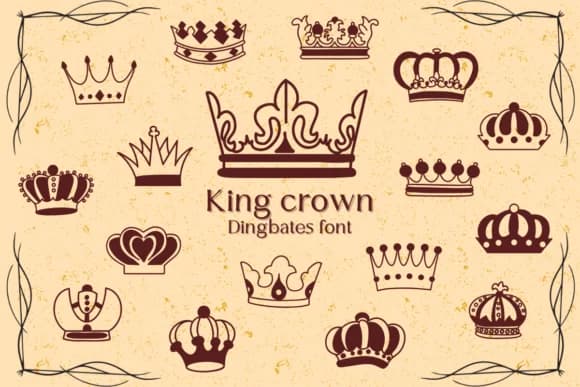
You're laying out a luxury wedding invitation suite and realize the corners need ornamental flourishes that feel sophisticated rather than saccharine. King Crown, a dingbats collection by Chonada, offers exactly what you're after: a set of crown motifs drawn with clean lines and vintage sensibility. Each symbol is rendered as a distinct icon within the font, so accessing them is as simple as typing a character in any design application.
The real strength here is versatility. These crowns work equally well as decorative borders in restaurant menu headers, accent elements on boutique product packaging, and framing devices for wedding signage and custom gift tags. Scrapbookers and graphic designers who build vintage-inspired layouts find them invaluable for adding polish without overwhelming a composition. Since each crown design comes with line variations and weight options, you're not locked into a single aesthetic, and that flexibility extends the font's usefulness across different project types.
The clean execution means these symbols read clearly at postage-stamp sizes and equally well anchoring a half-page banner. Grab it from Creative Fabrica and start adding refined royal touches to your work.
Style & Use Cases
- Overall Style
- Iconographic, Doodle
- Use Case
- Icons, Accents
- Ideal For
- ornaments, bullets, and decorative flourishes
- Pairs With
- any text font
How to Install King Crown Font
Step-by-step instructions for every platform
- 1Download the King Crown font file (.ttf or .otf).
- 2Locate the downloaded file in your Downloads folder.
- 3Right-click the font file.
- 4Select "Install" to install for the current user, or "Install for all users" to make it available system-wide.
- 5King Crown is now available in Word, Photoshop, Illustrator, and all other apps.




Browse fonts by theme
Curated collections →Saw a font in a picture? Identify any font from an image with our free Font Finder.
More Dingbats Fonts
Browse all →







What pairs well with King Crown Font?
King Crown Font is a versatile dingbats font that works for both headings and body text. Pair it with a contrasting sans-serif or serif font to add visual interest and a clear distinction between titles and body copy.



King Crown Font
by Chonada
Reviewed by the FontBoxDL team · Updated July 2026