 Firefox
About KG A Little Swag Font
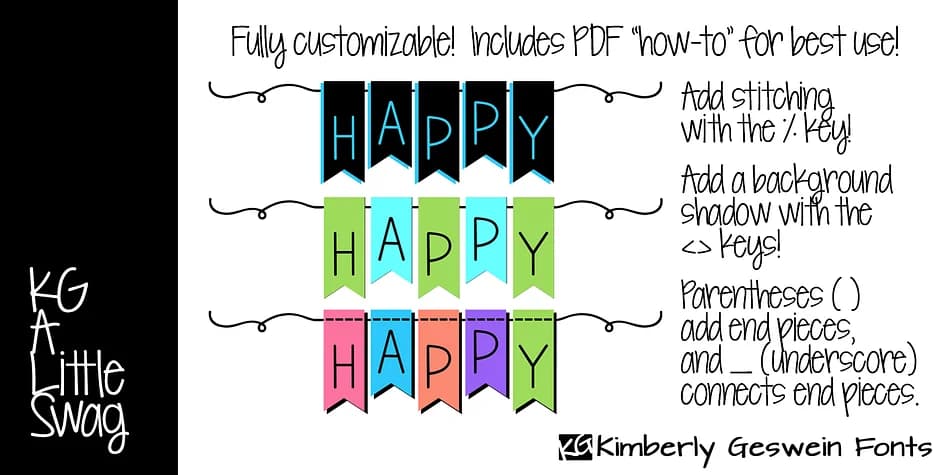
KG A Little Swag by Kimberly Geswein Fonts is a creative dingbat system built for custom bunting and banner designs. Unlike standard typefaces, each character serves a specific building purpose: capital letters generate long alphabet bunting, lowercase letters create short versions, and special characters provide the layering anchors and shadows you need. Parentheses have attachment tails for anchoring the bunting pieces, the underscore creates a connecting ribbon across sections, and the less-than and greater-than symbols build solid bunting shapes for shadows or color overlays.
Layering software like Photoshop or Affinity Photo unlocks the font's full potential, though you can stack multiple text boxes in Word or other programs to achieve similar effects if you prefer. This makes the font especially useful for birthday party banners, baby shower decorations, printable nursery signage, and DIY event bunting where visual depth and a handcrafted aesthetic matter. An included PDF guide walks through setup and best practices so you know exactly how to maximize each character and layer combination.
The real appeal lies in how customizable it is: adjust colors, spacing, and shadow intensity to match your design direction or brand. Get KG A Little Swag on Creative Fabrica and start building your next celebration's bunting with this playful, flexible system.
Style & Use Cases
- Overall Style
- Iconographic
- Use Case
- Icons, Accents
- Ideal For
- ornaments, bullets, and decorative flourishes
- Pairs With
- any text font
How to Install KG A Little Swag Font
Step-by-step instructions for every platform
- 1Download the KG A Little Swag font file (.ttf or .otf).
- 2Locate the downloaded file in your Downloads folder.
- 3Right-click the font file.
- 4Select "Install" to install for the current user, or "Install for all users" to make it available system-wide.
- 5KG A Little Swag is now available in Word, Photoshop, Illustrator, and all other apps.
More by Kimberly Geswein Fonts
View all →
Browse fonts by theme
Curated collections →Saw a font in a picture? Identify any font from an image with our free Font Finder.
More Dingbats Fonts
Browse all →







What pairs well with KG A Little Swag Font?
KG A Little Swag Font is a versatile dingbats font that works for both headings and body text. Pair it with a contrasting sans-serif or serif font to add visual interest and a clear distinction between titles and body copy.



KG A Little Swag Font
Reviewed by the FontBoxDL team · Updated August 2026