 Firefox
 1 / 8
1 / 8About Kawaii Christmas Dingbats Font
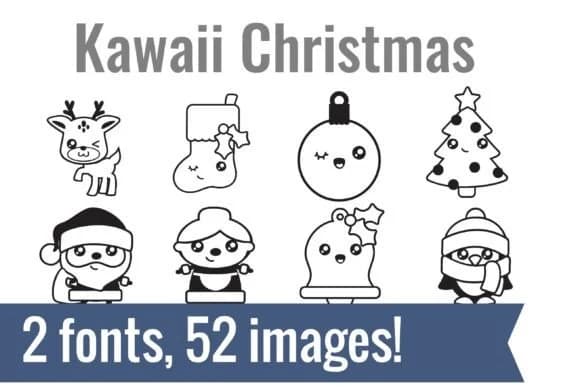
These adorable dingbat characters feel like opening a gift you didn't know you needed. Kawaii Christmas Dingbats, created by Illustration Ink, is a collection of 52 playful holiday glyphs that brings genuine warmth to any project. The design leans into what makes Kawaii appealing: oversized eyes, rounded shapes, and sweetness that doesn't feel forced. Each symbol is drawn as a clean outline vector, making them work equally well whether you're sketching them on paper or cutting them in design software.
You get reindeer with bright eyes, a winking ornament, Santa with his characteristic plumpness, a penguin bundled against the cold, and many more characters that clearly belong together as a set. This collection shines for specific projects: planner sticker sheets, children's holiday coloring books, custom fabric prints for Christmas stockings, and DIY advent calendar designs. Whether you're working with scissors and paper or a cutting machine, the glyphs scale smoothly and cut without fraying.
Pair these dingbats with a clean sans-serif for any text running alongside them, and the playfulness becomes a lively accent rather than the entire visual story. Find Kawaii Christmas Dingbats on Creative Fabrica to add this collection to your toolkit.
Style & Use Cases
- Overall Style
- Iconographic, Christmas Font
- Use Case
- Icons, Accents
- Ideal For
- ornaments, bullets, and decorative flourishes
- Pairs With
- any text font
How to Install Kawaii Christmas Dingbats Font
Step-by-step instructions for every platform
- 1Download the Kawaii Christmas Dingbats font file (.ttf or .otf).
- 2Locate the downloaded file in your Downloads folder.
- 3Right-click the font file.
- 4Select "Install" to install for the current user, or "Install for all users" to make it available system-wide.
- 5Kawaii Christmas Dingbats is now available in Word, Photoshop, Illustrator, and all other apps.
More by Illustration Ink
View all →



Browse fonts by theme
Curated collections →Saw a font in a picture? Identify any font from an image with our free Font Finder.
More Dingbats Fonts
Browse all →







What pairs well with Kawaii Christmas Dingbats Font?
Kawaii Christmas Dingbats Font is a versatile dingbats font that works for both headings and body text. Pair it with a contrasting sans-serif or serif font to add visual interest and a clear distinction between titles and body copy.



Kawaii Christmas Dingbats Font
Reviewed by the FontBoxDL team · Updated June 2026