 Firefox
 1 / 6
1 / 6About Jolly Circus Font
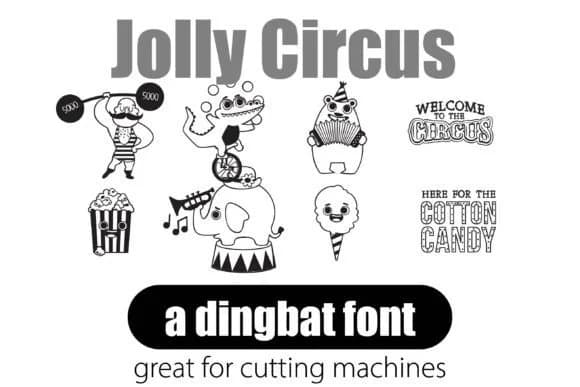
Jolly Circus from Illustration Ink delivers a playful collection of circus-themed characters and symbols designed to function as ready-made graphic elements. The font replaces standard letter keys with whimsical illustrations: clowns, acrobats, strongmen, and performance animals, along with supporting graphics like tickets and carnival elements, each rendered as a distinct, self-contained character that you can access with a single keystroke.
Dingbat fonts function differently than standard typefaces. Rather than offering alphabet letters, each key produces a self-contained illustration or symbol that you can integrate directly into layouts through typesetting. This approach saves significant time compared to sourcing or creating artwork separately, while maintaining visual consistency across multiple layouts and pages. Specific applications where this font excels include carnival and festive event invitations, children's birthday party designs and decorations, vintage fairground-style posters and signage, and themed packaging for party favors and craft gift boxes. When you need consistent, playful visual elements that reinforce a project's theme, dingbat fonts deliver without the friction of locating or creating graphics separately.
Projects requiring a playful, retro carnival aesthetic are where Jolly Circus truly excels, particularly for designers creating kids' event materials, vintage-inspired brand work, or independent craft projects. You can find this dingbat font on Creative Fabrica.
Style & Use Cases
- Overall Style
- Iconographic, Dingbat
- Use Case
- Icons, Accents
- Ideal For
- ornaments, bullets, and decorative flourishes
- Pairs With
- any text font
How to Install Jolly Circus Font
Step-by-step instructions for every platform
- 1Download the Jolly Circus font file (.ttf or .otf).
- 2Locate the downloaded file in your Downloads folder.
- 3Right-click the font file.
- 4Select "Install" to install for the current user, or "Install for all users" to make it available system-wide.
- 5Jolly Circus is now available in Word, Photoshop, Illustrator, and all other apps.
More by Illustration Ink
View all →



Browse fonts by theme
Curated collections →Saw a font in a picture? Identify any font from an image with our free Font Finder.
More Dingbats Fonts
Browse all →







What pairs well with Jolly Circus Font?
Jolly Circus Font is a versatile dingbats font that works for both headings and body text. Pair it with a contrasting sans-serif or serif font to add visual interest and a clear distinction between titles and body copy.



Jolly Circus Font
Reviewed by the FontBoxDL team · Updated June 2026