 Firefox
 1 / 3
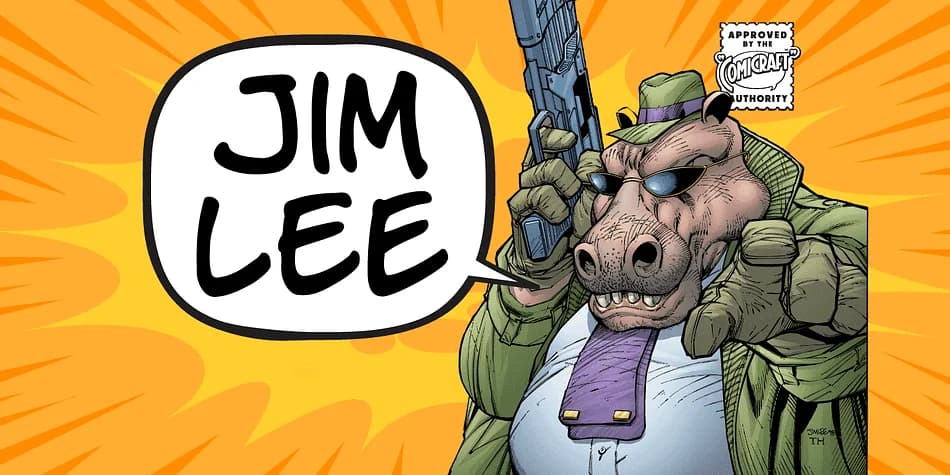
1 / 3About Jim Lee Font
Picture a bold, expressive hand-lettered title on the cover of a graphic novel or comic book, the kind where every letterform carries its own weight and personality. That's what Jim Lee brings to the table. This decorative font by Comicraft translates comic artist Jim Lee's actual handwriting into a working typeface with real character. Rather than simply scanning and processing his sketches, Comicraft invested serious time understanding the particular rhythm and flow of his lettering, capturing what makes his hand-drawn work feel distinctly his own.
This typeface excels on graphic novel covers and indie comic book projects where raw expressive letterforms matter most. It works equally well for album artwork and music packaging, tattoo design sheets, and convention signage where you need type that genuinely commands attention without any corporate polish. The handwriting-based foundation means each letter retains natural flow and visual personality, which comes fully alive at large display sizes. You get real breathing room in the spacing, which proves crucial when designing posters or social media graphics that need to break through the visual noise of a crowded feed.
The font includes multiple weights and alternates you can layer for added depth and expression. Get Jim Lee on Creative Fabrica to bring authentic hand-drawn energy to your projects.
Style & Use Cases
- Overall Style
- Bold, Distinctive
- Use Case
- Headlines, Posters
- Ideal For
- logos, packaging, and standout titles
- Pairs With
- a neutral sans-serif
How to Install Jim Lee Font
Step-by-step instructions for every platform
- 1Download the Jim Lee font file (.ttf or .otf).
- 2Locate the downloaded file in your Downloads folder.
- 3Right-click the font file.
- 4Select "Install" to install for the current user, or "Install for all users" to make it available system-wide.
- 5Jim Lee is now available in Word, Photoshop, Illustrator, and all other apps.
More by Comicraft
View all →
Browse fonts by theme
Curated collections →Saw a font in a picture? Identify any font from an image with our free Font Finder.
More Decorative Fonts
Browse all →







What pairs well with Jim Lee Font?
Jim Lee Font is a decorative font that shines as a display or heading face. Pair it with a clean sans-serif or serif font for body text — the contrast creates a clear hierarchy while the two styles stay balanced and easy to read.



Jim Lee Font
by Comicraft
Reviewed by the FontBoxDL team · Updated July 2026