 Firefox
 1 / 7
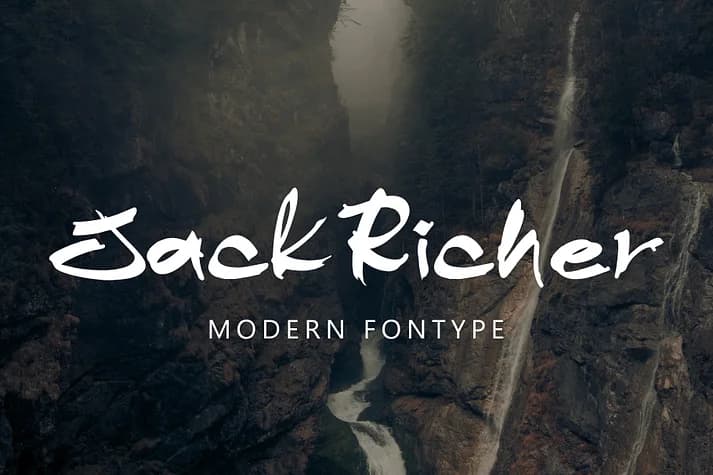
1 / 7About Jack Richer Font
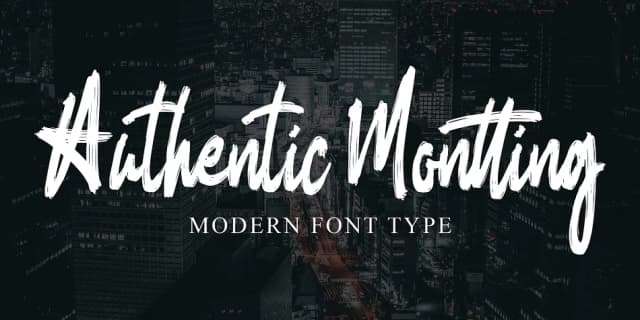
It feels like handwriting caught mid-brushstroke, loose and brimming with personality. Jack Richer, designed by Ayska, blends painterly texture with disciplined letterforms, creating something that reads as both refined and deliberately rough around the edges. Those dry-brush marks aren't ornamental touches; they're the backbone, giving every word an organic, lived-in quality that feels genuinely human rather than mechanically rendered.
This script excels on wine labels and craft brewery branding, where authentic character sets you apart from the predictable crowd. Use it for editorial mastheads, boutique spa packaging, handwritten invitation suites, vintage-style product labels, and luxury greeting cards where genuine handmade appeal is your real competitive hook. The textured surface holds strong when printed on canvas totes, embroidered hang tags, and textile labels. Scale the typeface down and the letterforms stay legible and truly expressive; the designer balanced texture with readability so carefully that roughness never interferes with clarity or functionality.
Pair Jack Richer with a clean, modern sans-serif for body copy and longer set text blocks, and you'll get visual contrast that truly makes both typefaces work together brilliantly. Get it on Creative Fabrica and bring that authentic brushwork texture to your next project, portfolio, or branding system.
Style & Use Cases
- Overall Style
- Elegant, Flowing
- Use Case
- Invitations, Branding
- Ideal For
- wedding stationery, greeting cards, and signatures
- Pairs With
- a simple uppercase sans
How to Install Jack Richer Font
Step-by-step instructions for every platform
- 1Download the Jack Richer font file (.ttf or .otf).
- 2Locate the downloaded file in your Downloads folder.
- 3Right-click the font file.
- 4Select "Install" to install for the current user, or "Install for all users" to make it available system-wide.
- 5Jack Richer is now available in Word, Photoshop, Illustrator, and all other apps.
Browse fonts by theme
Curated collections →Saw a font in a picture? Identify any font from an image with our free Font Finder.
More Script Handwritten Fonts
Browse all →







What pairs well with Jack Richer Font?
Jack Richer Font is a script font that shines as a display or heading face. Pair it with a clean sans-serif or serif font for body text — the contrast creates a clear hierarchy while the two styles stay balanced and easy to read.



Jack Richer Font
by Ayska
Reviewed by the FontBoxDL team · Updated July 2026