 Firefox
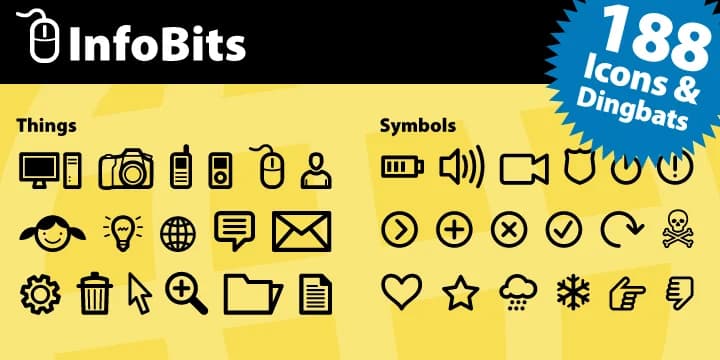
About InfoBits Font
InfoBits comes from Fonthead Design as a dual-font icon system focused squarely on technology. These 188 dingbat characters represent the full spectrum of digital life, from server and database symbols to networking, mobile, and cloud concepts. Each icon shares crisp, consistent stroke weight, which matters when you're scaling them up for headers or down for UI buttons.
What sets this collection apart is the specificity of its technology vocabulary. Rather than generic shapes, you get actual symbol clarity for SaaS dashboard interfaces, where users need instant visual recognition of what each element does. Tech blog graphics work particularly well with consistent icons throughout a series on software development or digital tools. Startup pitch decks read more professionally when they lean on coherent iconography, and app UI design for productivity software or developer tools becomes faster when the visual language is already solved for you. Even podcast cover art for tech shows benefits from icons that signal serious, knowledgeable content.
The dual-font structure gives you room to mix and match, keeping designs cohesive while avoiding monotony. For anyone building a SaaS product interface or creating documentation graphics for developer-facing software, InfoBits streamlines the visual thinking. Grab it on Creative Fabrica and put those 188 symbols to work.
Style & Use Cases
- Overall Style
- Iconographic
- Use Case
- Icons, Accents
- Ideal For
- ornaments, bullets, and decorative flourishes
- Pairs With
- any text font
How to Install InfoBits Font
Step-by-step instructions for every platform
- 1Download the InfoBits font file (.ttf or .otf).
- 2Locate the downloaded file in your Downloads folder.
- 3Right-click the font file.
- 4Select "Install" to install for the current user, or "Install for all users" to make it available system-wide.
- 5InfoBits is now available in Word, Photoshop, Illustrator, and all other apps.
More by Fonthead Design
View all →

Browse fonts by theme
Curated collections →Saw a font in a picture? Identify any font from an image with our free Font Finder.
More Dingbats Fonts
Browse all →







What pairs well with InfoBits Font?
InfoBits Font is a versatile dingbats font that works for both headings and body text. Pair it with a contrasting sans-serif or serif font to add visual interest and a clear distinction between titles and body copy.



InfoBits Font
Reviewed by the FontBoxDL team · Updated September 2026