 Firefox
 1 / 8
1 / 8About Iconic Garden Dingbats Font
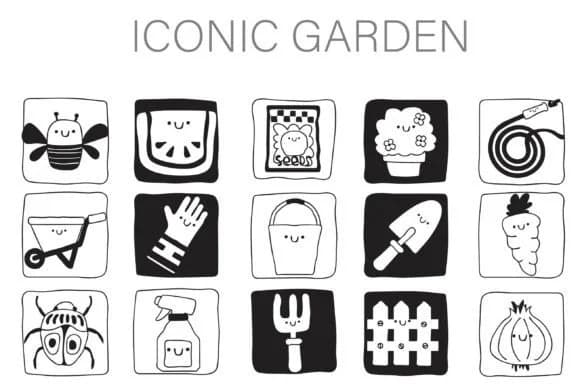
Iconic Garden Dingbats by Illustration Ink is a dingbat collection of friendly, hand-drawn garden characters. Each icon, from busy bees to watering cans to smiling vegetables, stands alone with personality, rendered in a distinctive inverse block style that alternates between black on white and white on black. This two-tone approach gives the marks real graphic presence without heaviness, making them flexible enough to work across different backgrounds, print formats, and digital contexts.
Spring event invitations, gardening blog graphics, farm stand signage, and eco-friendly product labels all benefit directly from these icons. The friendly, approachable quality makes them feel genuinely handmade rather than mechanical, which counts significantly when you're building a brand around natural or organic values. Anyone designing seed catalogs, farmer's market graphics, small-batch preserves packaging, or heritage plant promotional materials will recognize how much the hand-drawn sensibility contributes to building genuine trust with customers. The complete dingbat set provides both the black-on-white and white-on-black versions of each character, so you can choose the contrast level that matches your background and design mood.
Add Iconic Garden Dingbats to your Creative Fabrica library and get access to a font that genuinely earns its place in your professional toolkit through thoughtful design.
Style & Use Cases
- Overall Style
- Iconographic, Dingbat Font
- Use Case
- Icons, Accents
- Ideal For
- ornaments, bullets, and decorative flourishes
- Pairs With
- any text font
How to Install Iconic Garden Dingbats Font
Step-by-step instructions for every platform
- 1Download the Iconic Garden Dingbats font file (.ttf or .otf).
- 2Locate the downloaded file in your Downloads folder.
- 3Right-click the font file.
- 4Select "Install" to install for the current user, or "Install for all users" to make it available system-wide.
- 5Iconic Garden Dingbats is now available in Word, Photoshop, Illustrator, and all other apps.
More by Illustration Ink
View all →



Browse fonts by theme
Curated collections →Saw a font in a picture? Identify any font from an image with our free Font Finder.
More Dingbats Fonts
Browse all →







What pairs well with Iconic Garden Dingbats Font?
Iconic Garden Dingbats Font is a versatile dingbats font that works for both headings and body text. Pair it with a contrasting sans-serif or serif font to add visual interest and a clear distinction between titles and body copy.



Iconic Garden Dingbats Font
Reviewed by the FontBoxDL team · Updated June 2026