
 1 / 8
1 / 8About Ice Cream Font
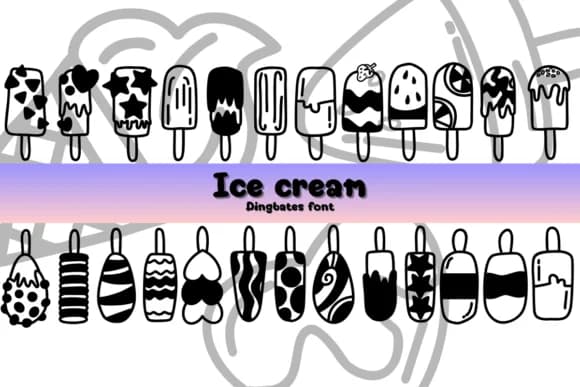
Ice Cream by Chonada is a playful dingbat font built entirely from ice cream and candy symbols. Instead of traditional letters, your typing produces a full character set representing scoops in different flavors, waffle cones, popsicles, lollipops, and frozen treats rendered in a charming hand-drawn style. Each glyph brings its own visual personality, making it simple to compose decorative arrangements and patterns. The font shines when creating cafe menus and window signage, summer party invitations and cards, ice cream parlor branding packages, and gelato shop decor that genuinely catches the eye without needing illustration software or imported graphics.
Beyond standard event design, the symbol-based approach opens interesting possibilities for candy shop product packaging, dessert-themed scrapbooking and craft layouts, and playful social media graphics focused on frozen or seasonal treats. Kids' birthday invitations almost design themselves with this one, since the visual impact comes built in. You can layer the characters to build custom patterns, use them as isolated decorative elements, or mix them with type for added visual texture in any design about food, celebration, or summer fun. The collection's variety means you have options rather than repetition.
If you want a straightforward way to bring frozen sweetness and whimsy into your next project, grab Ice Cream on Creative Fabrica.
Style & Use Cases
- Overall Style
- Iconographic, Ice Cream
- Use Case
- Icons, Accents
- Ideal For
- ornaments, bullets, and decorative flourishes
- Pairs With
- any text font
How to Install Ice Cream Font
Step-by-step instructions for every platform
- 1Download the Ice Cream font file (.ttf or .otf).
- 2Locate the downloaded file in your Downloads folder.
- 3Right-click the font file.
- 4Select "Install" to install for the current user, or "Install for all users" to make it available system-wide.
- 5Ice Cream is now available in Word, Photoshop, Illustrator, and all other apps.




Browse fonts by theme
Curated collections →Saw a font in a picture? Identify any font from an image with our free Font Finder.
More Dingbats Fonts
Browse all →







What pairs well with Ice Cream Font?
Ice Cream Font is a versatile dingbats font that works for both headings and body text. Pair it with a contrasting sans-serif or serif font to add visual interest and a clear distinction between titles and body copy.



Ice Cream Font
by Chonada
Reviewed by the FontBoxDL team · Updated July 2026