
 1 / 8
1 / 8About Hospital Font
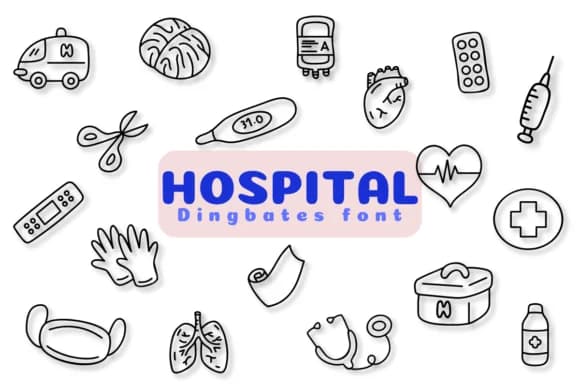
Hospital is a dingbat collection by Chonada that replaces traditional letters with sketched medical icons. Each character contains a different healthcare symbol, from stethoscopes and syringes to thermometers, bandages, ambulances, and prescription bottles, all rendered in a playful sketch style that feels both approachable and genuinely recognizable at any size.
This font shines when you need visual shorthand for health-related projects. Use it for doctor's office signage and appointment reminder cards that make patients feel comfortable, healthcare blog headers and infographic elements where complexity needs clarity, pharmacy label designs that balance technical information with warmth and personality, or medical student study guides and classroom materials. The informal linework makes clinical information feel less intimidating and more approachable to the people who actually need to understand it. Because each symbol is hand-sketched rather than geometric, the whole collection reads as friendly without sacrificing legibility.
Since each character is a distinct icon, you get an entire set of medical symbols without needing to hunt for separate graphic files or build your own illustrations. The consistent sketch aesthetic means all your healthcare visuals will pull together coherently, whether you're layering them into digital layouts or printing them on physical materials. This font works best for projects aimed at patients, students, or any audience that benefits from clear, relatable medical communication. Find Hospital on Creative Fabrica to streamline your healthcare design workflow.
Style & Use Cases
- Overall Style
- Iconographic, Doodle
- Use Case
- Icons, Accents
- Ideal For
- ornaments, bullets, and decorative flourishes
- Pairs With
- any text font
How to Install Hospital Font
Step-by-step instructions for every platform
- 1Download the Hospital font file (.ttf or .otf).
- 2Locate the downloaded file in your Downloads folder.
- 3Right-click the font file.
- 4Select "Install" to install for the current user, or "Install for all users" to make it available system-wide.
- 5Hospital is now available in Word, Photoshop, Illustrator, and all other apps.




Browse fonts by theme
Curated collections →Saw a font in a picture? Identify any font from an image with our free Font Finder.
More Dingbats Fonts
Browse all →







What pairs well with Hospital Font?
Hospital Font is a versatile dingbats font that works for both headings and body text. Pair it with a contrasting sans-serif or serif font to add visual interest and a clear distinction between titles and body copy.



Hospital Font
by Chonada
Reviewed by the FontBoxDL team · Updated August 2026