 Firefox
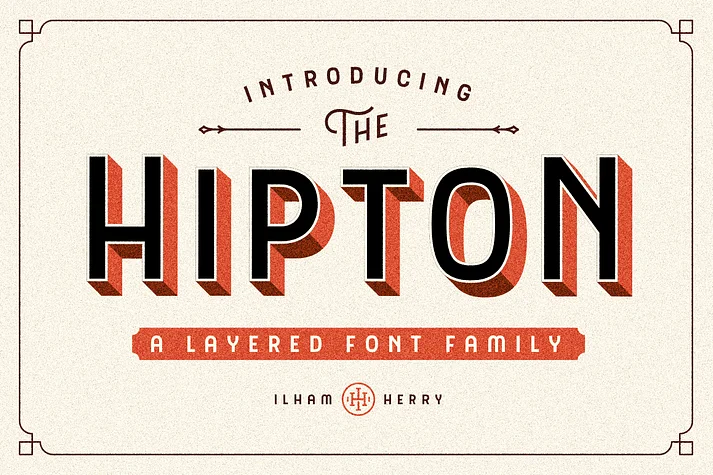 1 / 8
1 / 8About Hipton Font
Hipton by Ilham Herry is a display typeface built on layered stroke principles, directly inspired by classic gothic letterforms used in traditional hand-painted sign work. The complete family offers seven complementary weights (Regular, Line, Inline, Outline, Extrude, Extrude Shadow, and Extrude Line) that function either in combination with one another or as standalone choices, giving you the ability to create dimensional effects that would otherwise require complex layering work or managing multiple separate fonts.
This works especially well for custom apparel graphics, vintage concert and festival posters, craft brewery branding systems, hand-made signage, and retro logo designs where you want that authentic painted-letter feel with complete creative control. Because each weight functions as its own independent layer, you're free to mix and match, building custom shadow effects, layering colors for visual depth, or settling on a single weight as your starting point. The gothic character stays strong throughout the entire family, delivering that sturdy, confident presence sign painters have relied on for generations, while the stroke system gives you flexibility that single-weight typefaces simply cannot offer. You get both the flexibility and the control to push your designs further.
Get Hipton on Creative Fabrica and start building with these layered letterforms.
Style & Use Cases
- Overall Style
- Bold, Distinctive
- Use Case
- Headlines, Posters
- Ideal For
- logos, packaging, and standout titles
- Pairs With
- a neutral sans-serif
How to Install Hipton Font
Step-by-step instructions for every platform
- 1Download the Hipton font file (.ttf or .otf).
- 2Locate the downloaded file in your Downloads folder.
- 3Right-click the font file.
- 4Select "Install" to install for the current user, or "Install for all users" to make it available system-wide.
- 5Hipton is now available in Word, Photoshop, Illustrator, and all other apps.
More by Ilham Herry
View all →
Browse fonts by theme
Curated collections →Saw a font in a picture? Identify any font from an image with our free Font Finder.
More Decorative Fonts
Browse all →







What pairs well with Hipton Font?
Hipton Font is a decorative font that shines as a display or heading face. Pair it with a clean sans-serif or serif font for body text — the contrast creates a clear hierarchy while the two styles stay balanced and easy to read.




Hipton Font
by Ilham Herry
Reviewed by the FontBoxDL team · Updated June 2026