 Firefox
 1 / 3
1 / 3Loading font…
About Heydings Common Icons Font
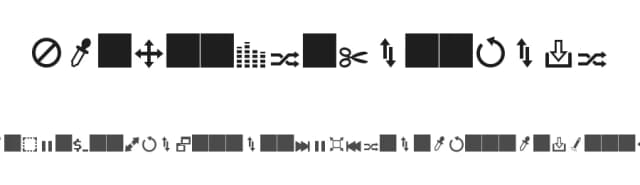
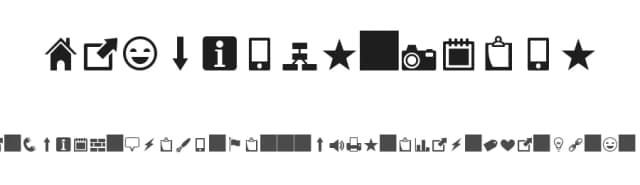
Heydings Common Icons by Heydon Pickering is a dingbat face built as an icon set you type rather than import. Only one style ships here, a Regular, and the drawing leans toward programming and interface motifs with geometric, decorative and comic notes mixed in. Typing icons has a practical upside: the shapes scale and take color the same way text does, so a single glyph works at 14 pixels in a nav bar and again at 400 pixels on a wall print.
That makes it useful for developer documentation sidebars, section dividers in a technical blog, engineering conference slide decks where each bullet needs a small mark, and terminal themed sticker sheets or laptop decals. Since the tags put it under Display and Headings rather than body copy, treat each glyph as a standalone graphic element and give it room. One weight means there is nothing to pair against inside the family, so contrast has to come from size and spacing. Letterspacing matters more than usual with a face like this, because icons set tight read as clutter. Pair it with a plain grotesque or a mono for any actual reading text, and let the icons carry the personality on their own.
Heydon Pickering released it under the Open Font License, which means it is free to use in both personal and commercial work, and the files download directly from this page.
Style & Use Cases
- Overall Style
- Iconographic, Dingbat
- Use Case
- Icons, Accents
- Ideal For
- ornaments, bullets, and decorative flourishes
- Pairs With
- any text font
Heydings Common Icons Specifications
| Font Family | Heydings Icons |
| Style | Regular |
| Full Name | Heydings Icons |
| Version | 1.2 |
| Weight | 400 (Regular) |
| Glyph Count | 63 glyphs |
| PostScript Name | Heydings Icons |
| Format | TTF (TrueType) |
| File Size | 11.9 KB |
Languages Supported
Heydings Common Icons supports 7 languages.
How to Install Heydings Common Icons Font
Step-by-step instructions for every platform
- 1Download the Heydings Common Icons font file (.ttf or .otf).
- 2Locate the downloaded file in your Downloads folder.
- 3Right-click the font file.
- 4Select "Install" to install for the current user, or "Install for all users" to make it available system-wide.
- 5Heydings Common Icons is now available in Word, Photoshop, Illustrator, and all other apps.
More by Heydon Pickering
View all →

Browse fonts by theme
Curated collections →Saw a font in a picture? Identify any font from an image with our free Font Finder.
More Dingbats Fonts
Browse all →







What pairs well with Heydings Common Icons Font?
Heydings Common Icons Font is a versatile dingbats font that works for both headings and body text. Pair it with a contrasting sans-serif or serif font to add visual interest and a clear distinction between titles and body copy.



Premium Dingbats Fonts
★ PremiumWant something with more weights, glyphs, and commercial polish? These premium dingbats fonts are worth a look.


Heydings Common Icons Font
Reviewed by the FontBoxDL team · Updated September 2026