 Firefox
 1 / 4
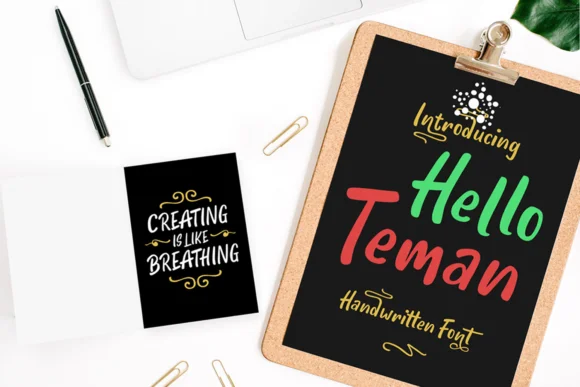
1 / 4About Hello Teman Font
Hello Teman by Andrian Dehasta is a lively handwritten script that brings warmth and personality to projects where a friendly, approachable aesthetic truly matters. With playful character proportions and an organic flow, this typeface excels in applications calling for genuine hand-lettered charm without technical complexity. From personalized wedding invitation suites and Etsy shop branding to boutique skincare packaging and DIY celebration signage, Hello Teman delivers that hand-crafted feel without requiring advanced calligraphy expertise. The font comes with both regular and italic variants, plus thoughtful alternate characters that let you add visual variety and authentic character options throughout your layouts.
This versatility makes Hello Teman particularly well-suited for custom greeting cards, cohesive stationery sets, social media graphics, restaurant menu cards, and event programs where personality drives the visual design. The included alternates help you avoid repetitive letterforms, creating compositions that feel genuinely hand-lettered rather than mechanically typeset. Whether you're tackling a small creative project or building a comprehensive brand identity, this typeface brings the spontaneous energy and artisanal quality that modern audiences increasingly seek in contemporary design work.
Explore Hello Teman on Creative Fabrica and bring authentic hand-lettered charm to your next creative project.
Style & Use Cases
- Overall Style
- Elegant, Flowing, Hello Teman
- Use Case
- Invitations, Branding
- Ideal For
- wedding stationery, greeting cards, and signatures
- Pairs With
- a simple uppercase sans
How to Install Hello Teman Font Font
Step-by-step instructions for every platform
- 1Download the Hello Teman Font font file (.ttf or .otf).
- 2Locate the downloaded file in your Downloads folder.
- 3Right-click the font file.
- 4Select "Install" to install for the current user, or "Install for all users" to make it available system-wide.
- 5Hello Teman Font is now available in Word, Photoshop, Illustrator, and all other apps.
More by Andrian Dehasta
View all →
Browse fonts by theme
Curated collections →Saw a font in a picture? Identify any font from an image with our free Font Finder.
More Script Handwritten Fonts
Browse all →







What pairs well with Hello Teman Font?
Hello Teman Font is a script font that shines as a display or heading face. Pair it with a clean sans-serif or serif font for body text — the contrast creates a clear hierarchy while the two styles stay balanced and easy to read.




Hello Teman Font
Reviewed by the FontBoxDL team · Updated May 2026