 Firefox
 1 / 4
1 / 4About Halloweenies Font
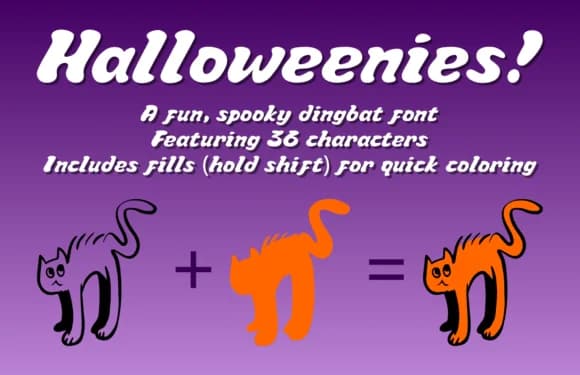
There's something refreshing about a Halloween font that leans into fun instead of full horror mode. Halloweenies, created by Ben Dunkle, is a dingbats font built entirely from seasonal symbols rather than traditional letters. You get skeletons, grinning pumpkins, bats, ghosts, haunted houses, and witches, each designed to feel more playful than genuinely frightening.
The practical uses stack up fast. Think Halloween party invitations where you arrange the symbols as decorative borders, spooky thank you cards for trick-or-treat exchanges, seasonal wall art and garland designs you can print and assemble, or custom gift tags for Halloween candy bags and party favors. Because it's a symbol font, every keystroke pulls up a different graphic, giving you complete control over placement and scale without bouncing between multiple files or hunting for separate icon sets. Working with it feels natural and intuitive, which matters when you're juggling deadlines and just need something that does the job.
Pair it with a clean, readable sans-serif for any supporting text, and you'll ground the playfulness while keeping the overall design from becoming chaotic. Grab it on Creative Fabrica and you've got a single font file that handles all your seasonal icon needs without feeling overdesigned or cluttered.
Style & Use Cases
- Overall Style
- Iconographic, Halloween Font
- Use Case
- Icons, Accents
- Ideal For
- ornaments, bullets, and decorative flourishes
- Pairs With
- any text font
How to Install Halloweenies Font
Step-by-step instructions for every platform
- 1Download the Halloweenies font file (.ttf or .otf).
- 2Locate the downloaded file in your Downloads folder.
- 3Right-click the font file.
- 4Select "Install" to install for the current user, or "Install for all users" to make it available system-wide.
- 5Halloweenies is now available in Word, Photoshop, Illustrator, and all other apps.
More by Ben Dunkle
View all →


Browse fonts by theme
Curated collections →Saw a font in a picture? Identify any font from an image with our free Font Finder.
More Dingbats Fonts
Browse all →







What pairs well with Halloweenies Font?
Halloweenies Font is a versatile dingbats font that works for both headings and body text. Pair it with a contrasting sans-serif or serif font to add visual interest and a clear distinction between titles and body copy.



Halloweenies Font
by Ben Dunkle
Reviewed by the FontBoxDL team · Updated July 2026