 Firefox
 1 / 8
1 / 8About Halloweendinner Regular Font
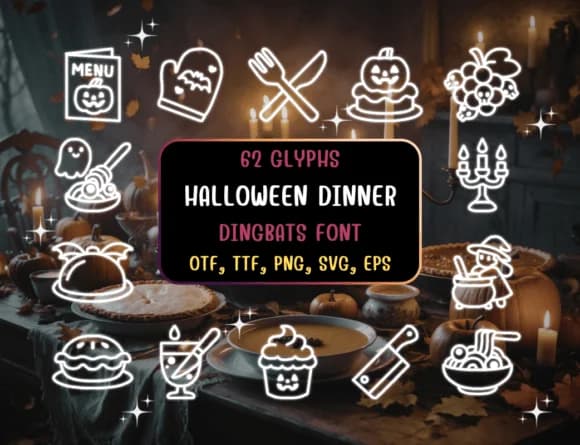
Halloweendinner Regular by Distiny4919 is a dingbat font built entirely from spooky seasonal icons rather than traditional letters. Inside you'll find 62 glyphs ranging from bubbling cauldrons and flickering candles to pies, cocktails, and eerie menu symbols. All hand-drawn but finished with crisp, bold outlines, they stay legible and playful across different sizes.
This works beautifully for Halloween menu cards, where the icons add real personality without cluttering the layout. Party invitation suites, trick-or-treat candy labels, and festive apparel designs all benefit from that handmade warmth paired with professional polish. You'll find multiple weights and ornamental variations built in, so you can layer them into sticker sheets, digital projects, or print layouts without hunting around for companion fonts. Both OTF and TTF formats are included, plus SVG and EPS vector files if your workflow requires them for production use.
Load it into your design tool and start typing. Each keystroke pulls a different doodle, which means you skip the typical glyph hunting and move straight to creating. Stacking multiple glyphs creates instant pattern and texture for any design that needs a bit of seasonal flavor. When you're ready to add this playful collection to your toolkit, grab it on Creative Fabrica.
Style & Use Cases
- Overall Style
- Iconographic, Fonts
- Use Case
- Icons, Accents
- Ideal For
- ornaments, bullets, and decorative flourishes
- Pairs With
- any text font
How to Install Halloweendinner Regular Font
Step-by-step instructions for every platform
- 1Download the Halloweendinner Regular font file (.ttf or .otf).
- 2Locate the downloaded file in your Downloads folder.
- 3Right-click the font file.
- 4Select "Install" to install for the current user, or "Install for all users" to make it available system-wide.
- 5Halloweendinner Regular is now available in Word, Photoshop, Illustrator, and all other apps.
Browse fonts by theme
Curated collections →Saw a font in a picture? Identify any font from an image with our free Font Finder.
More Dingbats Fonts
Browse all →







What pairs well with Halloweendinner Regular Font?
Halloweendinner Regular Font is a versatile dingbats font that works for both headings and body text. Pair it with a contrasting sans-serif or serif font to add visual interest and a clear distinction between titles and body copy.



Halloweendinner Regular Font
by Distiny4919
Reviewed by the FontBoxDL team · Updated June 2026