 Firefox
 1 / 8
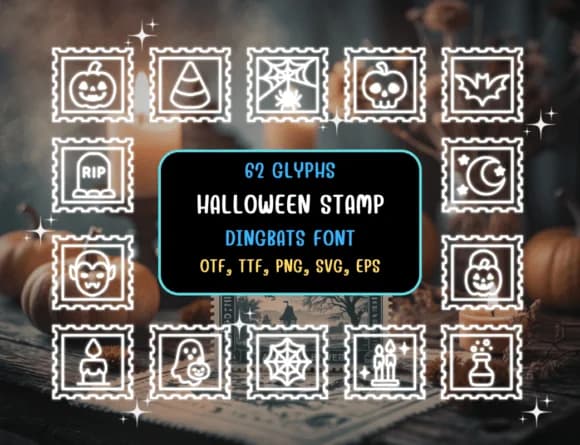
1 / 8About Halloween Stamp Font
This font strikes that elusive balance between genuinely spooky and genuinely fun. Halloween Stamp, created by Distiny4919, is a hand-drawn dingbats collection that sidesteps generic icon libraries in favor of real character and personality. The set includes 62 unique glyphs, each keystroke delivering a different Halloween illustration: pumpkins, potions, ghosts, and gravestones rendered in a loose, sketchy style that reads as handmade rather than sterile or digitally perfect.
Where this collection really shines is in its focused versatility within a single strong visual theme. Deploy it for Halloween party invitation suites where you want visual interest without fussiness, DIY sticker sheets for trick-or-treat bag toppers, small-batch candy and tea packaging labels with real charm, or spooky classroom bulletin board decorations that kids actually find delightful instead of corporate. Teachers particularly value how it maintains crisp sharpness in print across sizes, from business-card work all the way to poster dimensions, without any loss of definition or character.
Combine this with a clean, minimal sans-serif for any body copy you need, letting the dingbats carry the visual load and do what they do best. You'll find it right here, ready to download on Creative Fabrica whenever you're building your next seasonal design collection.
Style & Use Cases
- Overall Style
- Iconographic, Dingbats Font
- Use Case
- Icons, Accents
- Ideal For
- ornaments, bullets, and decorative flourishes
- Pairs With
- any text font
How to Install Halloween Stamp Font
Step-by-step instructions for every platform
- 1Download the Halloween Stamp font file (.ttf or .otf).
- 2Locate the downloaded file in your Downloads folder.
- 3Right-click the font file.
- 4Select "Install" to install for the current user, or "Install for all users" to make it available system-wide.
- 5Halloween Stamp is now available in Word, Photoshop, Illustrator, and all other apps.
Browse fonts by theme
Curated collections →Saw a font in a picture? Identify any font from an image with our free Font Finder.
More Dingbats Fonts
Browse all →







What pairs well with Halloween Stamp Font?
Halloween Stamp Font is a versatile dingbats font that works for both headings and body text. Pair it with a contrasting sans-serif or serif font to add visual interest and a clear distinction between titles and body copy.



Halloween Stamp Font
by Distiny4919
Reviewed by the FontBoxDL team · Updated June 2026