 Firefox
 1 / 8
1 / 8About Halloween Doodle Font
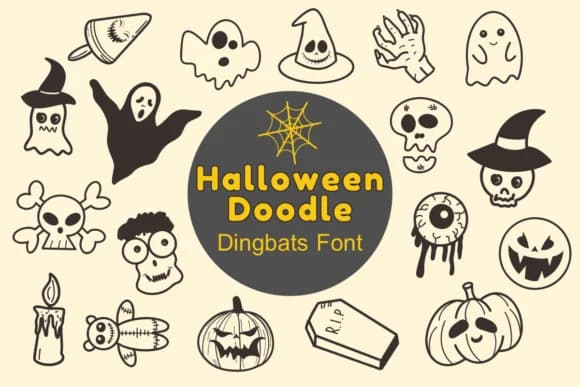
Halloween Doodle by Nun Sukhwan is a playful dingbat font where each character replaces traditional letters with Halloween imagery, including pumpkins, ghosts, bats, witches' hats, and more. The collection lets you construct entire messages using festive symbols alone, giving your typography a lighthearted edge that feels distinctly seasonal and hand-drawn. This approach eliminates the need for traditional letterforms when you want pure visual charm and immediate seasonal context.
The font works particularly well for seasonal greeting cards and Halloween announcement suites, trick-or-treat invitation packages, custom labels for craft items and face painting bottles, and autumn festival booth signage. Small business owners reach for it for Etsy product packaging and holiday-specific social media graphics that stand out from corporate templates. Classroom teachers find it especially useful when creating October bulletin board displays, Halloween party materials, and seasonal worksheet decorations that feel genuinely handmade rather than mass-produced.
Because it's designed as monochrome imagery, the font translates cleanly across production methods: ink on kraft paper, die-cut silhouettes, screen printing, and digital applications. Get Halloween Doodle on Creative Fabrica and discover how this one distinctive font can transform routine seasonal work into something your audience genuinely enjoys looking at.
Style & Use Cases
- Overall Style
- Iconographic, Dingbats Font
- Use Case
- Icons, Accents
- Ideal For
- ornaments, bullets, and decorative flourishes
- Pairs With
- any text font
How to Install Halloween Doodle Font
Step-by-step instructions for every platform
- 1Download the Halloween Doodle font file (.ttf or .otf).
- 2Locate the downloaded file in your Downloads folder.
- 3Right-click the font file.
- 4Select "Install" to install for the current user, or "Install for all users" to make it available system-wide.
- 5Halloween Doodle is now available in Word, Photoshop, Illustrator, and all other apps.
More by Nun Sukhwan
View all →



Browse fonts by theme
Curated collections →Saw a font in a picture? Identify any font from an image with our free Font Finder.
More Dingbats Fonts
Browse all →







What pairs well with Halloween Doodle Font?
Halloween Doodle Font is a versatile dingbats font that works for both headings and body text. Pair it with a contrasting sans-serif or serif font to add visual interest and a clear distinction between titles and body copy.



Halloween Doodle Font
by Nun Sukhwan
Reviewed by the FontBoxDL team · Updated July 2026