 Firefox
 1 / 8
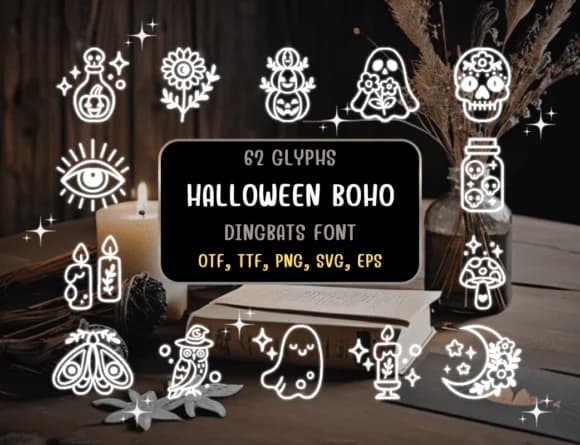
1 / 8About Halloween Boho Font
Distiny4919's Halloween Boho font trades clipart sharpness for hand-drawn warmth, filling each keystroke with sketchy dingbats that feel organic rather than stiff. The letterforms are actually standalone illustrations: spooky pumpkins, cute ghosts, playful bats, and other autumn-tinged creatures that activate differently depending on which key you press, making composition feel intuitive rather than menu-heavy.
This dingbat works particularly well for Halloween party invitations with that artsy, intentional look, DIY trick-or-treat labels printed and cut by hand, and Etsy shop graphics where the handmade quality actually signals craft and care to buyers. Wedding engagement parties during October also gain depth from its friendly irreverence, as do boutique haunted-house promotional materials and community craft-project guides. The collection includes both outline and filled versions, allowing for layering and subtle overlap techniques in design software like Procreate, Affinity Designer, and Adobe Illustrator.
Designers building seasonal branding campaigns or running creative community projects that genuinely need character and personality will find real value in this typeface. Its hand-drawn aesthetic reads authentic and intentional without tipping into overwrought territory. Find it on Creative Fabrica, where it sits alongside other hand-crafted type collections built for designers who care about the details.
Style & Use Cases
- Overall Style
- Iconographic, Fonts
- Use Case
- Icons, Accents
- Ideal For
- ornaments, bullets, and decorative flourishes
- Pairs With
- any text font
How to Install Halloween Boho Font
Step-by-step instructions for every platform
- 1Download the Halloween Boho font file (.ttf or .otf).
- 2Locate the downloaded file in your Downloads folder.
- 3Right-click the font file.
- 4Select "Install" to install for the current user, or "Install for all users" to make it available system-wide.
- 5Halloween Boho is now available in Word, Photoshop, Illustrator, and all other apps.
Browse fonts by theme
Curated collections →Saw a font in a picture? Identify any font from an image with our free Font Finder.
More Dingbats Fonts
Browse all →







What pairs well with Halloween Boho Font?
Halloween Boho Font is a versatile dingbats font that works for both headings and body text. Pair it with a contrasting sans-serif or serif font to add visual interest and a clear distinction between titles and body copy.



Halloween Boho Font
by Distiny4919
Reviewed by the FontBoxDL team · Updated June 2026