 Firefox
 1 / 6
1 / 6About Halloween Font
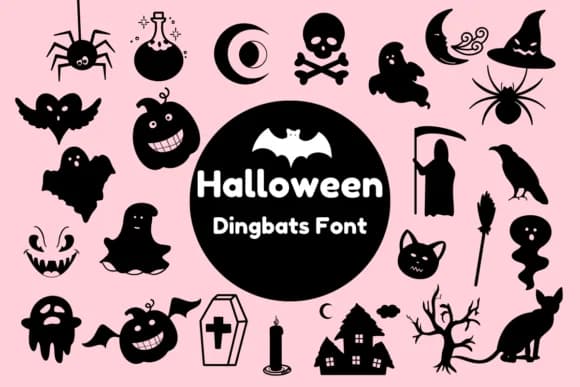
Halloween by Nun Sukhwan is a playful dingbat collection that replaces ordinary characters with spooky seasonal imagery. Type and you get pumpkins, bats, witches' hats, and ghosts in place of regular letterforms. Each keystroke builds a small Halloween scene, which is dingbat design stripped down to its essential purpose.
This collection shines brightest in specific use cases where visual impact outweighs readable text. Halloween party invitations gain instant charm and personality, trick-or-treat sticker sheets come together with minimal effort, and classroom bulletin board displays materialize in minutes. Teachers reach for fonts like this because they need festive graphics quickly, without scouring clip art databases for hours. Gift tags, scrapbooking layouts, and printable door decorations are equally suited to this approach.
The vintage character in Nun's linework prevents this from feeling too cute or juvenile. The shapes land comfortably between playful and sophisticated, allowing you to adapt it to adult-leaning designs just as readily as children's projects. A monochrome palette keeps the collection versatile across different print scales, from tiny stickers to large t-shirt graphics. When you need typography to carry your entire design concept, find Halloween on Creative Fabrica and start designing with your keystroke.
Style & Use Cases
- Overall Style
- Iconographic, Dingbats Font
- Use Case
- Icons, Accents
- Ideal For
- ornaments, bullets, and decorative flourishes
- Pairs With
- any text font
How to Install Halloween Font
Step-by-step instructions for every platform
- 1Download the Halloween font file (.ttf or .otf).
- 2Locate the downloaded file in your Downloads folder.
- 3Right-click the font file.
- 4Select "Install" to install for the current user, or "Install for all users" to make it available system-wide.
- 5Halloween is now available in Word, Photoshop, Illustrator, and all other apps.
More by Nun Sukhwan
View all →



Browse fonts by theme
Curated collections →Saw a font in a picture? Identify any font from an image with our free Font Finder.
More Dingbats Fonts
Browse all →







What pairs well with Halloween Font?
Halloween Font is a versatile dingbats font that works for both headings and body text. Pair it with a contrasting sans-serif or serif font to add visual interest and a clear distinction between titles and body copy.



Halloween Font
by Nun Sukhwan
Reviewed by the FontBoxDL team · Updated June 2026