 Firefox
 1 / 8
1 / 8Loading font…
About Grass Font
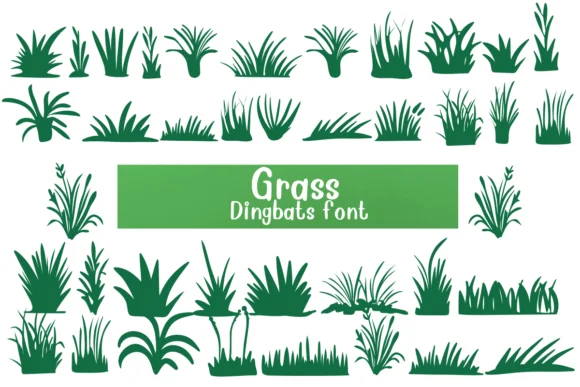
This font brings playful, organic energy to designs celebrating the natural world. Grass, created by Nongyao, transforms standard letters and numbers into charming grass illustrations, offering a dingbat approach that adds visual texture and movement through simple typing.
The real value emerges in specific applications: coloring activity sheets and books for young artists, botanical and environmental study materials for classrooms, garden club newsletters and community publications, and eco-conscious packaging designs for sustainable brands. Each character is a distinct grass shape, giving you rich visual variety from a single keystroke. This makes Grass especially effective for pattern backdrops, layered compositions, and overlays where you need organic visual interest without relying on text. The multiple grass forms work beautifully as decorative separators, flourishes, and borders throughout your designs. You get genuine design flexibility from a single font file, capable of covering both standalone visual elements and supporting roles in larger compositions.
Pair this with a clean, minimalist sans-serif to keep body text readable while these expressive dingbats add visual punch and personality. The contrast between structured typography and organic illustration creates natural visual balance on a page. Find Grass on Creative Fabrica and start bringing botanical texture and movement to your environmental and nature-focused projects.
Style & Use Cases
- Overall Style
- Iconographic, Fonts
- Use Case
- Icons, Accents
- Ideal For
- ornaments, bullets, and decorative flourishes
- Pairs With
- any text font
How to Install Grass Font
Step-by-step instructions for every platform
- 1Download the Grass font file (.ttf or .otf).
- 2Locate the downloaded file in your Downloads folder.
- 3Right-click the font file.
- 4Select "Install" to install for the current user, or "Install for all users" to make it available system-wide.
- 5Grass is now available in Word, Photoshop, Illustrator, and all other apps.




Browse fonts by theme
Curated collections →Saw a font in a picture? Identify any font from an image with our free Font Finder.
More Dingbats Fonts
Browse all →







What pairs well with Grass Font?
Grass Font is a versatile dingbats font that works for both headings and body text. Pair it with a contrasting sans-serif or serif font to add visual interest and a clear distinction between titles and body copy.




Grass Font
by Nongyao
Reviewed by the FontBoxDL team · Updated October 2026