 Firefox
 1 / 4
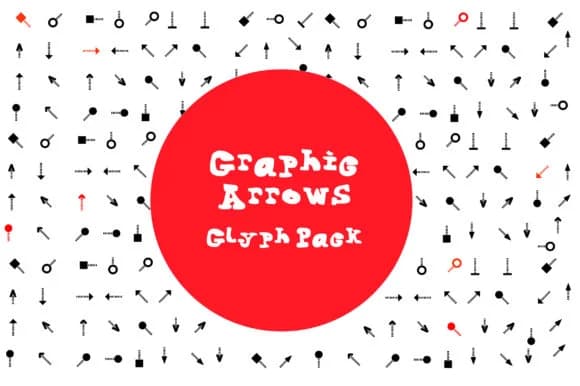
1 / 4About BM Graphics - Graphic Arrows Glyph Font
You're designing an infographic about workflow steps and need arrow symbols that don't feel stock or generic. BM Graphics - Graphic Arrows Glyph from GraphicsBam Fonts delivers exactly that: a comprehensive dingbat set with directional glyphs in multiple styles. The pack includes loads of arrow variations covering different directions and visual weights, so you can layer them throughout a single layout without feeling repetitive or forced to customize each instance.
This font works particularly well for flowchart templates, process diagrams in presentations, navigation icon systems on website mockups, and directional signage. You'll also find it valuable for scrapbooking layouts and DIY craft projects where arrows naturally guide the eye through the page. Since every character you type produces a ready-made arrow instead of requiring hand-drawn illustration, you cut production time significantly while maintaining visual consistency across your entire project. The dingbat approach means no tracing, redrawing, or hunting for the perfect arrow PNG online.
What makes the font especially practical is the range of directional variations and weights available in the pack. You can establish visual hierarchy and create emphasis purely through size and style choices, which matters when your design needs multiple arrow sizes but requires strict consistency. The whole collection is on Creative Fabrica, ready to download and install into your design toolkit.
Style & Use Cases
- Overall Style
- Iconographic, Pack
- Use Case
- Icons, Accents
- Ideal For
- ornaments, bullets, and decorative flourishes
- Pairs With
- any text font
How to Install BM Graphics - Graphic Arrows Glyph Font
Step-by-step instructions for every platform
- 1Download the BM Graphics - Graphic Arrows Glyph font file (.ttf or .otf).
- 2Locate the downloaded file in your Downloads folder.
- 3Right-click the font file.
- 4Select "Install" to install for the current user, or "Install for all users" to make it available system-wide.
- 5BM Graphics - Graphic Arrows Glyph is now available in Word, Photoshop, Illustrator, and all other apps.
More by GraphicsBam Fonts
View all →
Browse fonts by theme
Curated collections →Saw a font in a picture? Identify any font from an image with our free Font Finder.
More Dingbats Fonts
Browse all →







What pairs well with BM Graphics - Graphic Arrows Glyph Font?
BM Graphics - Graphic Arrows Glyph Font is a versatile dingbats font that works for both headings and body text. Pair it with a contrasting sans-serif or serif font to add visual interest and a clear distinction between titles and body copy.



BM Graphics - Graphic Arrows Glyph Font
Reviewed by the FontBoxDL team · Updated July 2026