 Firefox
 1 / 8
1 / 8About Goudy Text CT Font
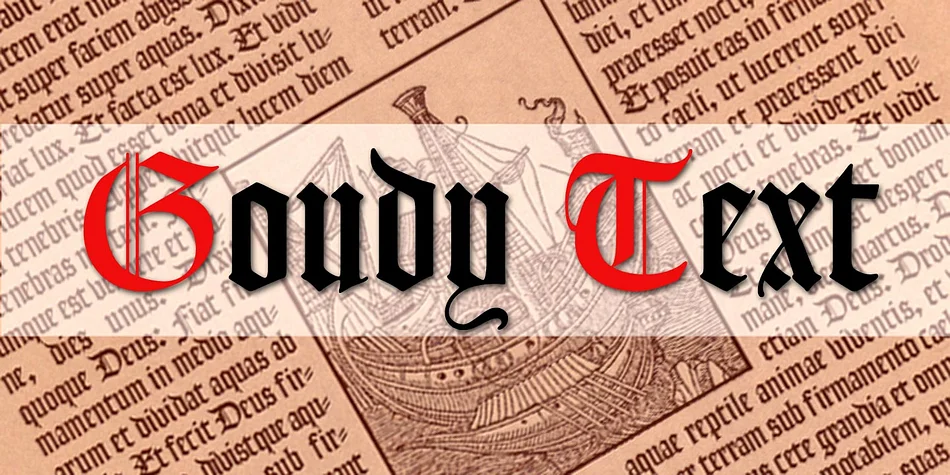
Picture a luxury wedding invitation suite arriving in someone's mailbox. Goudy Text CT, designed by CastleType, brings the authentic warmth of Frederic Goudy's original pen drawings to screen and print. Rather than follow the streamlined metal type version that became standard, this revival honors the subtle irregularities and character of Goudy's hand-drawn letterforms. Those organic variations give the typeface genuine character, making it feel hand-drawn and unpredictable in the best way rather than machine-perfect.
The typeface works beautifully in formal contexts where blackletter carries real weight. Certificate design, decorative book chapters, vintage brewery branding, and heritage product packaging all benefit from its warmth. The Lombardy caps are particularly striking as oversized initials or drop caps in editorial layouts and formal stationery. They pair especially well with serif body text in publishing and brand identity projects.
For designers reaching for blackletter work, Goudy Text CT offers the historical authenticity of manuscript tradition without the coldness of technical precision. The typeface reads clearly even at display sizes thanks to its well-proportioned letterforms. Find it on Creative Fabrica and bring that handwritten charm to your next formal design.
Style & Use Cases
- Overall Style
- Ornate, Gothic
- Use Case
- Logos, Certificates
- Ideal For
- medieval themes, band merch, and tattoo lettering
- Pairs With
- a clean sans-serif for body text
How to Install Goudy Text CT Font
Step-by-step instructions for every platform
- 1Download the Goudy Text CT font file (.ttf or .otf).
- 2Locate the downloaded file in your Downloads folder.
- 3Right-click the font file.
- 4Select "Install" to install for the current user, or "Install for all users" to make it available system-wide.
- 5Goudy Text CT is now available in Word, Photoshop, Illustrator, and all other apps.
More by CastleType
View all →

Browse fonts by theme
Curated collections →Saw a font in a picture? Identify any font from an image with our free Font Finder.
More Blackletter Fonts
Browse all →
What pairs well with Goudy Text CT Font?
Goudy Text CT Font is a blackletter font that shines as a display or heading face. Pair it with a clean serif or sans-serif font for body text — the contrast creates a clear hierarchy while the two styles stay balanced and easy to read.




Goudy Text CT Font
by CastleType
Reviewed by the FontBoxDL team · Updated June 2026