 Firefox
 1 / 5
1 / 5About Glitch Squares Font
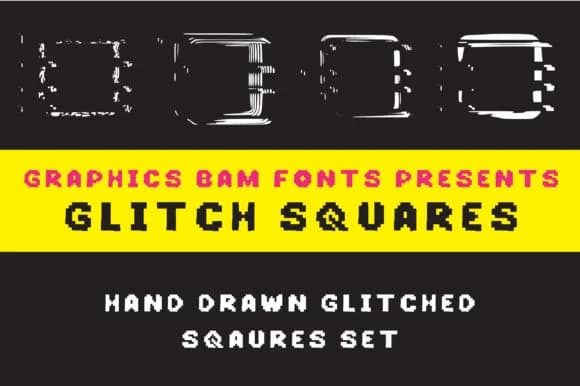
Glitch Squares presents a distinctly modular, blocky aesthetic by fragmenting individual letterforms into a careful grid of pixelated squares that read as deliberately distorted and intentionally broken at the edges. Designed by GraphicsBam Fonts, this dingbat collection trades traditional smooth curves for uncompromising hard-edged geometry, creating that raw, digital-artifact appearance that has become central to contemporary graphic work across both print and digital applications. The effect recalls early computer graphics and pixel art, bringing visual texture to any design that needs an edge.
The font excels wherever a tech-forward or intentionally distressed visual language strengthens the work: retro video game graphics, edgy social media cover designs, modern poster art, and tech-inspired sticker sheets all benefit from its precise pixelation. Because individual squares stack into recognizable glyphs despite their fragmented construction, it performs equally well in both print and screen-based contexts, holding legibility across scales. Use it for merchandise graphics, digital illustrations, or paper-based craft projects where blocky, angular forms feel appropriate.
Built for designers pursuing a glitch or retro-digital sensibility, the font holds its own across scales and applications. Get Glitch Squares from Creative Fabrica and start exploring what its stark geometry brings to your designs.
Style & Use Cases
- Overall Style
- Iconographic, Shapes
- Use Case
- Icons, Accents
- Ideal For
- ornaments, bullets, and decorative flourishes
- Pairs With
- any text font
How to Install Glitch Squares Font
Step-by-step instructions for every platform
- 1Download the Glitch Squares font file (.ttf or .otf).
- 2Locate the downloaded file in your Downloads folder.
- 3Right-click the font file.
- 4Select "Install" to install for the current user, or "Install for all users" to make it available system-wide.
- 5Glitch Squares is now available in Word, Photoshop, Illustrator, and all other apps.
More by GraphicsBam Fonts
View all →
Browse fonts by theme
Curated collections →Saw a font in a picture? Identify any font from an image with our free Font Finder.
More Dingbats Fonts
Browse all →







What pairs well with Glitch Squares Font?
Glitch Squares Font is a versatile dingbats font that works for both headings and body text. Pair it with a contrasting sans-serif or serif font to add visual interest and a clear distinction between titles and body copy.



Glitch Squares Font
Reviewed by the FontBoxDL team · Updated July 2026