 Firefox
 1 / 6
1 / 6About Glitch Shape Font
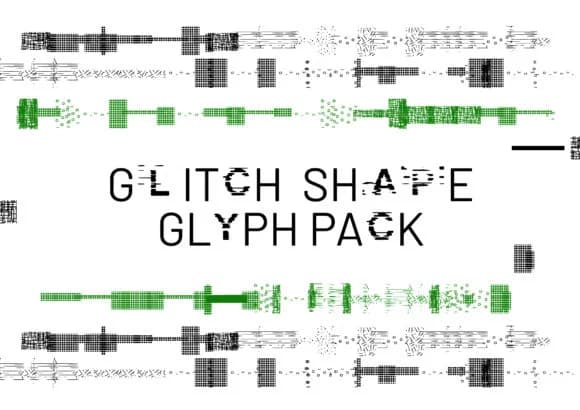
The fractured, distorted shapes in this font collection lean into digital decay and computational malfunction, capturing that rawness of error aesthetics. Glitch Shape by GraphicsBam Fonts delivers this vision through 81 carefully designed dingbats that feel broken by design, each a visual fragment or stuttering form. The character set provides raw material for anyone chasing that corrupted, tech-gone-wrong vibe.
These marks work exceptionally well for album cover layouts, where glitch effects add texture and movement to the composition. Video game interface mockups benefit from having a ready set of error icons and fragmented shapes. Band posters and electronic music flyers gain an immediate sense of digital distortion. You'll also find them useful for creating animated stutter effects, glitch backgrounds in video editing, or even retro computer art pieces that play with the idea of system failure.
This font speaks directly to designers and artists working in experimental, tech-forward spaces. For a hacker-themed game, vaporwave aesthetic content, or music video layering effects, Glitch Shape provides the visual vocabulary you need. The fragmentary nature of the character set makes it ideal for building with controlled chaos. Grab it on Creative Fabrica and start exploring what corrupted aesthetics can do for your next project.
Style & Use Cases
- Overall Style
- Iconographic, Glitch
- Use Case
- Icons, Accents
- Ideal For
- ornaments, bullets, and decorative flourishes
- Pairs With
- any text font
How to Install Glitch Shape Font
Step-by-step instructions for every platform
- 1Download the Glitch Shape font file (.ttf or .otf).
- 2Locate the downloaded file in your Downloads folder.
- 3Right-click the font file.
- 4Select "Install" to install for the current user, or "Install for all users" to make it available system-wide.
- 5Glitch Shape is now available in Word, Photoshop, Illustrator, and all other apps.
More by GraphicsBam Fonts
View all →
Browse fonts by theme
Curated collections →Saw a font in a picture? Identify any font from an image with our free Font Finder.
More Dingbats Fonts
Browse all →







What pairs well with Glitch Shape Font?
Glitch Shape Font is a versatile dingbats font that works for both headings and body text. Pair it with a contrasting sans-serif or serif font to add visual interest and a clear distinction between titles and body copy.



Glitch Shape Font
Reviewed by the FontBoxDL team · Updated July 2026