 Firefox
 1 / 5
1 / 5About Glitch Crosses Font
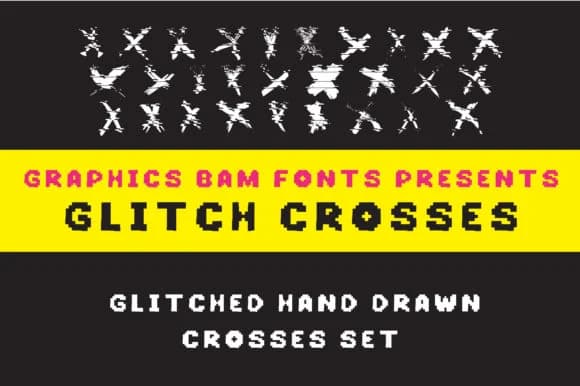
You're designing a poster for a retro gaming event, and the header needs something with visual punch. Glitch Crosses by GraphicsBam Fonts delivers exactly that: a pixelated dingbats typeface where each character renders as a distorted cross or geometric shape. This is dingbat typography for people who want their graphics to land with an edgy, digital feel rather than blend into the background.
The font works particularly well for DIY sticker suites where the geometric nature gives each piece a consistent, modular appearance. Wedding invitation borders clearly benefit from the structured distortion these crosses provide, and posters announcing indie music events or community art shows gain visual impact from the intentional glitchy aesthetic. Print-on-demand packaging labels and greeting card overlays pick up an unexpected modern edge when a few strategically placed glyphs anchor the design. Even web graphics and digital banners benefit from the quirky geometric vocabulary the font provides.
The real strength here is how legible the pixel-based design remains when you scale up for large format work. The consistent cross-based structure means you can freely layer and combine glyphs without descending into visual noise or clutter. Snag it on Creative Fabrica and expand your dingbat toolkit.
Style & Use Cases
- Overall Style
- Iconographic, Shapes
- Use Case
- Icons, Accents
- Ideal For
- ornaments, bullets, and decorative flourishes
- Pairs With
- any text font
How to Install Glitch Crosses Font
Step-by-step instructions for every platform
- 1Download the Glitch Crosses font file (.ttf or .otf).
- 2Locate the downloaded file in your Downloads folder.
- 3Right-click the font file.
- 4Select "Install" to install for the current user, or "Install for all users" to make it available system-wide.
- 5Glitch Crosses is now available in Word, Photoshop, Illustrator, and all other apps.
More by GraphicsBam Fonts
View all →
Browse fonts by theme
Curated collections →Saw a font in a picture? Identify any font from an image with our free Font Finder.
More Dingbats Fonts
Browse all →







What pairs well with Glitch Crosses Font?
Glitch Crosses Font is a versatile dingbats font that works for both headings and body text. Pair it with a contrasting sans-serif or serif font to add visual interest and a clear distinction between titles and body copy.



Glitch Crosses Font
Reviewed by the FontBoxDL team · Updated July 2026