 Firefox
 1 / 4
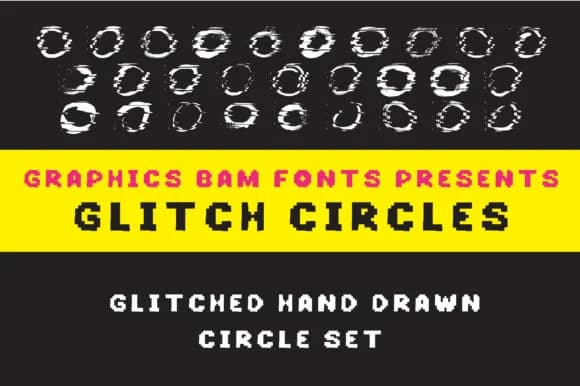
1 / 4About Glitch Circles Font
Glitch Circles by GraphicsBam Fonts is a pixelated dingbat collection with a distinctly digital-glitch aesthetic. The font's chunky geometric shapes work beautifully for retro video game graphics, digital sticker sets for social media, playful scrapbooking elements, and print-on-demand merchandise that demands visual impact. Its bold, blocky characters deliver a striking visual punch that stands out on greeting cards, band poster layouts, and any project needing some pixelated irreverence.
The complete and versatile character set provides an extensive range of circular and geometric symbols, giving you plenty of flexibility for both standalone graphic applications and decorative accents layered alongside traditional type. Each shape maintains crisp edges and readability even at smaller sizes, making it particularly useful for web graphics, digital product mockups, and social media templates where precision and personality matter equally. The pixelated approach avoids feeling like pure nostalgia; instead it carries an authentic glitch-art sensibility that feels contemporary without overreaching.
This dingbat pack brings genuine visual personality to work that might otherwise fade into the background. Glitch Circles gives you the tools to add texture and movement without overwhelming your overall composition. Head to Creative Fabrica and grab Glitch Circles to see how these shapes transform your next project.
Style & Use Cases
- Overall Style
- Iconographic, Shapes
- Use Case
- Icons, Accents
- Ideal For
- ornaments, bullets, and decorative flourishes
- Pairs With
- any text font
How to Install Glitch Circles Font
Step-by-step instructions for every platform
- 1Download the Glitch Circles font file (.ttf or .otf).
- 2Locate the downloaded file in your Downloads folder.
- 3Right-click the font file.
- 4Select "Install" to install for the current user, or "Install for all users" to make it available system-wide.
- 5Glitch Circles is now available in Word, Photoshop, Illustrator, and all other apps.
More by GraphicsBam Fonts
View all →
Browse fonts by theme
Curated collections →Saw a font in a picture? Identify any font from an image with our free Font Finder.
More Dingbats Fonts
Browse all →







What pairs well with Glitch Circles Font?
Glitch Circles Font is a versatile dingbats font that works for both headings and body text. Pair it with a contrasting sans-serif or serif font to add visual interest and a clear distinction between titles and body copy.



Glitch Circles Font
Reviewed by the FontBoxDL team · Updated July 2026