 Firefox
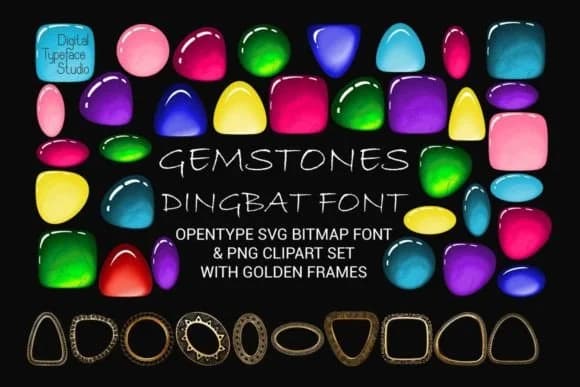 1 / 6
1 / 6About Gemstones Font
Gemstones by Digital Typeface Studio is a dingbat collection built around faceted gem symbols, rendered as colorful vector shapes that hold their quality across sizes. Each character delivers a jewel-like icon: cut stones, gem clusters, and decorative frames that carry genuine depth rather than flat clip-art feel. The font ships as OpenType SVG (with bitmap fallbacks), which means you get true color rendering when your software supports it, plus traditional monochrome options for anything else.
You'll reach for this one when you're designing wedding invitation suites that need that luxury touch, jewelry store tags and product labels, or boutique beauty packaging where the symbol carries the brand message. It works equally well for tarot deck layouts, greeting cards with a gemstone accent theme, or any mystical and wellness branding that calls for ornamental elements. The symbol set is substantial, giving you room to compose frames and flourishes without repetition.
Best suited for designers and small business owners working on packaging, stationery, and print projects where color and ornament matter. Grab it from Creative Fabrica and start experimenting with how these stones anchor your compositions.
Style & Use Cases
- Overall Style
- Iconographic, Gemstone Font
- Use Case
- Icons, Accents
- Ideal For
- ornaments, bullets, and decorative flourishes
- Pairs With
- any text font
How to Install Gemstones Font
Step-by-step instructions for every platform
- 1Download the Gemstones font file (.ttf or .otf).
- 2Locate the downloaded file in your Downloads folder.
- 3Right-click the font file.
- 4Select "Install" to install for the current user, or "Install for all users" to make it available system-wide.
- 5Gemstones is now available in Word, Photoshop, Illustrator, and all other apps.
More by Digital Typeface Studio
View all →

Browse fonts by theme
Curated collections →Saw a font in a picture? Identify any font from an image with our free Font Finder.
More Dingbats Fonts
Browse all →







What pairs well with Gemstones Font?
Gemstones Font is a versatile dingbats font that works for both headings and body text. Pair it with a contrasting sans-serif or serif font to add visual interest and a clear distinction between titles and body copy.



Gemstones Font
Reviewed by the FontBoxDL team · Updated July 2026