 Firefox
 1 / 4
1 / 4About Fruit Font
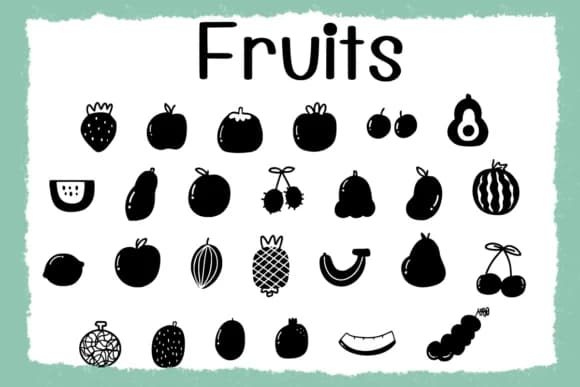
Hand-drawn fruit characters bring a charming, organic quality to Fruit, a playful dingbat typeface created by Foam-Design Store. The letterforms have the warmth of sketched illustrations rather than geometric precision, making each symbol feel personal and handmade. From apples to bananas to oranges, every fruit character captures the naive charm and visual lightness that comes from working with pen and paper, then translating that feel into a usable typeface.
This dingbat set shines on projects where a touch of whimsy and genuine approachability matters. Farmer's market labels and produce packaging work beautifully with its hand-crafted feel, giving ordinary items a boutique quality. Recipe cards, smoothie bar menus, and farm-to-table restaurant branding all gain visual personality through these friendly fruit icons. Kids' birthday party invitations, sticker sheets for bullet journals, organic juice bottle designs, and craft stickers for children's books equally benefit from the typeface's playful character. Even gift box labels for homemade jams or preserves feel more authentic with these symbols on them.
Fruit excels for designers building kid-friendly or wellness-focused visual identities where organic charm and approachability matter more than corporate precision. Brand identity work, layout design that needs playful symbol breaks, and creative projects aimed at younger audiences all come alive with this typeface's character. Find Fruit on Creative Fabrica to bring hand-drawn charm to your next design.
Style & Use Cases
- Overall Style
- Iconographic, Fruit
- Use Case
- Icons, Accents
- Ideal For
- ornaments, bullets, and decorative flourishes
- Pairs With
- any text font
How to Install Fruit Font
Step-by-step instructions for every platform
- 1Download the Fruit font file (.ttf or .otf).
- 2Locate the downloaded file in your Downloads folder.
- 3Right-click the font file.
- 4Select "Install" to install for the current user, or "Install for all users" to make it available system-wide.
- 5Fruit is now available in Word, Photoshop, Illustrator, and all other apps.
More by Foam-Design Store
View all →

Browse fonts by theme
Curated collections →Saw a font in a picture? Identify any font from an image with our free Font Finder.
More Dingbats Fonts
Browse all →







What pairs well with Fruit Font?
Fruit Font is a versatile dingbats font that works for both headings and body text. Pair it with a contrasting sans-serif or serif font to add visual interest and a clear distinction between titles and body copy.



Fruit Font
Reviewed by the FontBoxDL team · Updated July 2026