
 1 / 8
1 / 8About Fruit Font
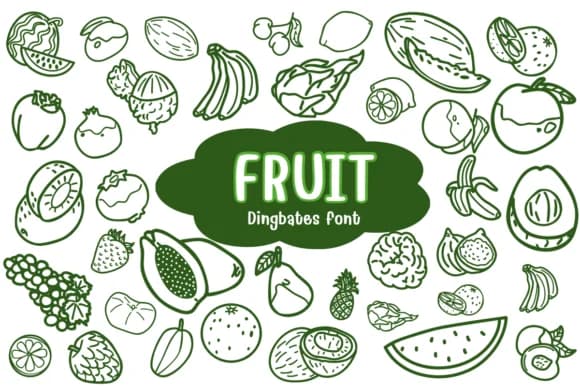
You're laying out a farmers market poster and you need icons that feel fresh and genuinely human rather than corporate and sterile. Fruit, a dingbats typeface by Chonada, gives you exactly that: a collection of hand-drawn produce symbols that bring real visual warmth to your layouts without requiring any heavy lifting on your end.
The character set includes useful variations for different fruits and vegetables (strawberries, bananas, kiwi, mushrooms, cucumbers), all paired with rainbow options built in so you can experiment freely with color and tone in your designs. This makes it particularly valuable for organic juice labels, farmers market signage, healthy recipe cards, and DIY wellness app graphics where you want to convey personality and depth rather than polish and formality. Beyond those, it works equally well in child-friendly book illustrations or small-batch food packaging where fresh and playful language matters. The icons scale effectively from large display sizes down to small supporting marks, so they adapt across many different layout scenarios and applications.
Grab it from Creative Fabrica and you have a visual vocabulary that genuinely reads as fresh rather than feeling like clipart. It's exactly the kind of practical tool that saves time if you're working in the natural food or wellness space and tired of seeing the same stock icons on repeat across projects.
Style & Use Cases
- Overall Style
- Iconographic, Food
- Use Case
- Icons, Accents
- Ideal For
- ornaments, bullets, and decorative flourishes
- Pairs With
- any text font
How to Install Fruit Font
Step-by-step instructions for every platform
- 1Download the Fruit font file (.ttf or .otf).
- 2Locate the downloaded file in your Downloads folder.
- 3Right-click the font file.
- 4Select "Install" to install for the current user, or "Install for all users" to make it available system-wide.
- 5Fruit is now available in Word, Photoshop, Illustrator, and all other apps.




Browse fonts by theme
Curated collections →Saw a font in a picture? Identify any font from an image with our free Font Finder.
More Dingbats Fonts
Browse all →







What pairs well with Fruit Font?
Fruit Font is a versatile dingbats font that works for both headings and body text. Pair it with a contrasting sans-serif or serif font to add visual interest and a clear distinction between titles and body copy.



Fruit Font
by Chonada
Reviewed by the FontBoxDL team · Updated July 2026