 Firefox
 1 / 5
1 / 5About Froggy Font
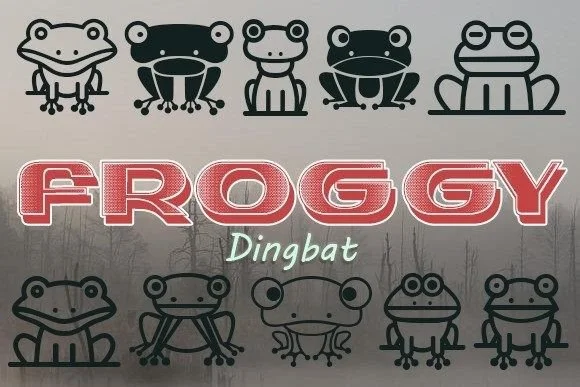
Froggy by vladimirnikolic is a whimsical dingbat typeface built around charming frog characters and playful flourishes. This collection brings personality to a range of creative work, from wedding invitation suites and save-the-date postcards to handmade greeting cards and scrapbooking layouts. Its decorative nature makes it ideal for paper-based projects where personality and charm matter most. Designers who want character without the overhead of sourcing and adjusting custom illustrations will appreciate this thoughtful approach.
Ready-made amphibian motifs are the heart of this dingbat set, letting you drop frog elements into layouts without hunting for compatible graphics. Such work particularly suits DIY craft packaging, custom product labels, and boutique stationery designs. When working on intimate celebrations, nature-themed children's projects, or decorative postcards, you'll find these characters carry consistent visual weight and maintain their charm at any size.
What makes Froggy stand out is how intentional the frog characters feel rather than clip-art-adjacent. Every glyph was designed to work cohesively, so mixing and matching feels natural rather than chaotic. Versatility comes through in how it handles both headline work and decorative spacing with equal ease, making it work across multiple design contexts within a single project. Pick up Froggy on Creative Fabrica and let these hoppy companions bring life to your next creative work.
Style & Use Cases
- Overall Style
- Iconographic, Dingbat
- Use Case
- Icons, Accents
- Ideal For
- ornaments, bullets, and decorative flourishes
- Pairs With
- any text font
How to Install Froggy Font
Step-by-step instructions for every platform
- 1Download the Froggy font file (.ttf or .otf).
- 2Locate the downloaded file in your Downloads folder.
- 3Right-click the font file.
- 4Select "Install" to install for the current user, or "Install for all users" to make it available system-wide.
- 5Froggy is now available in Word, Photoshop, Illustrator, and all other apps.
More by vladimirnikolic
View all →


Browse fonts by theme
Curated collections →Saw a font in a picture? Identify any font from an image with our free Font Finder.
More Dingbats Fonts
Browse all →







What pairs well with Froggy Font?
Froggy Font is a versatile dingbats font that works for both headings and body text. Pair it with a contrasting sans-serif or serif font to add visual interest and a clear distinction between titles and body copy.




Froggy Font
Reviewed by the FontBoxDL team · Updated July 2026