 Firefox
 1 / 8
1 / 8Loading font…
About Frames Font
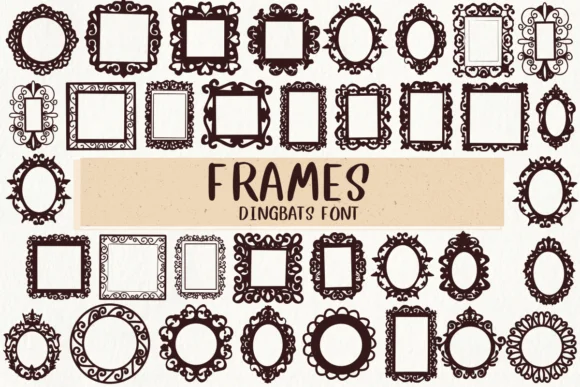
You're laying out a wedding invitation suite and need ornamental frames that feel refined, not overwrought. Frames, a dingbat collection from designer Nongyao, swaps traditional letterforms for decorative borders and architectural frames. Instead of typing characters, you place frame designs around text, imagery, or white space, with each one functioning as a structural design element rather than supplementary decoration.
This collection speaks directly to several specific projects: elegant invitation suites requiring sophisticated framing, Etsy product labels where limited space demands strong visual weight, scrapbooking layouts that benefit from authentic ornamental borders, and DIY craft signs where printed frames would feel sterile and impersonal. The designs reference antique and carved aesthetics, ranging from delicate botanical frames to bolder geometric options. You get both outline and solid versions, giving you flexibility to layer them over existing artwork or use them as standalone design elements.
What makes Frames stand out is legibility at large display sizes (where many decorative fonts collapse into visual chaos) and compatibility across both OTF and TTF formats for virtually any software. This means you're not locked into a single design application and won't face format frustrations. If your next project calls for decorative framing, Frames is available on Creative Fabrica.
Style & Use Cases
- Overall Style
- Iconographic, หมวด Dingbats Fonts Fonts
- Use Case
- Icons, Accents
- Ideal For
- ornaments, bullets, and decorative flourishes
- Pairs With
- any text font
How to Install Frames Font
Step-by-step instructions for every platform
- 1Download the Frames font file (.ttf or .otf).
- 2Locate the downloaded file in your Downloads folder.
- 3Right-click the font file.
- 4Select "Install" to install for the current user, or "Install for all users" to make it available system-wide.
- 5Frames is now available in Word, Photoshop, Illustrator, and all other apps.




Browse fonts by theme
Curated collections →Saw a font in a picture? Identify any font from an image with our free Font Finder.
More Dingbats Fonts
Browse all →







What pairs well with Frames Font?
Frames Font is a versatile dingbats font that works for both headings and body text. Pair it with a contrasting sans-serif or serif font to add visual interest and a clear distinction between titles and body copy.




Frames Font
by Nongyao
Reviewed by the FontBoxDL team · Updated October 2026