 Firefox
 1 / 8
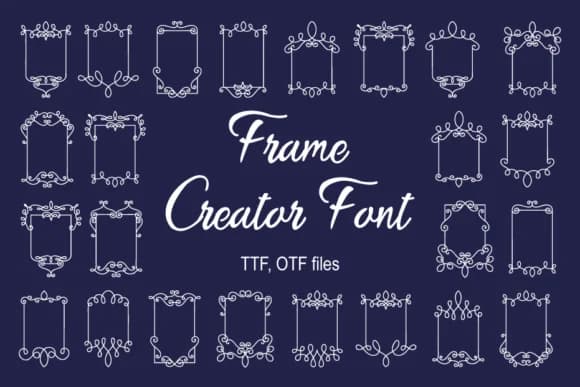
1 / 8About Frame Creator Font
Frame Creator by Digital Typeface Studio is a decorative dingbats font brimming with ornamental borders and intricate frame elements. The typeface excels in design projects that need visual structure paired with genuine handcrafted character. Scrapbooking layouts transform with its varied frame options, while DIY wedding invitation suites gain immediate polish from its detailed borders. Small business owners turn to it for Etsy product labels and boutique packaging designs that demand a personal, handmade touch. Each frame element holds enough visual weight to anchor a layout without overshadowing supporting text.
The font delivers dozens of decorative frames and corner ornaments, each crafted with precision line work and careful detail. Hand-drawn greeting card borders, vintage postcard collages, ornamental dividers for book design, and editorial flourishes all find their perfect match here. Illustrators use it to add dimensional touches to layouts and covers, while DIY journal creators rely on its consistent line weights to frame handwritten entries. Book designers often layer multiple frames together for complex title pages and section breaks.
If you need decorative elements that feel both structured and artistic, Frame Creator deserves a spot in your library. Get it on Creative Fabrica.
Style & Use Cases
- Overall Style
- Iconographic, Frame Creator
- Use Case
- Icons, Accents
- Ideal For
- ornaments, bullets, and decorative flourishes
- Pairs With
- any text font
How to Install Frame Creator Font
Step-by-step instructions for every platform
- 1Download the Frame Creator font file (.ttf or .otf).
- 2Locate the downloaded file in your Downloads folder.
- 3Right-click the font file.
- 4Select "Install" to install for the current user, or "Install for all users" to make it available system-wide.
- 5Frame Creator is now available in Word, Photoshop, Illustrator, and all other apps.
More by Digital Typeface Studio
View all →

Browse fonts by theme
Curated collections →Saw a font in a picture? Identify any font from an image with our free Font Finder.
More Dingbats Fonts
Browse all →







What pairs well with Frame Creator Font?
Frame Creator Font is a versatile dingbats font that works for both headings and body text. Pair it with a contrasting sans-serif or serif font to add visual interest and a clear distinction between titles and body copy.



Frame Creator Font
Reviewed by the FontBoxDL team · Updated July 2026