 Firefox
 1 / 7
1 / 7About Fly Ghost Font
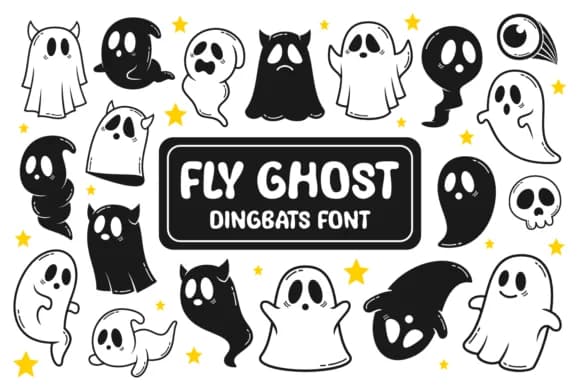
This font radiates mischievous Halloween energy that feels genuinely playful rather than dark. Fly Ghost, designed by Situjuh, is a dingbats collection where every keystroke delivers an illustration instead of a letter, giving you two complete sets of ghost characters to work with for layering and composition.
The uppercase and lowercase keys each trigger different ghost designs, so you're never forced to repeat the same pose. Inside you'll discover grinning spirits, bewildered specters, and wide-eyed phantoms in various moods, alongside a supporting cast of skulls, eyeballs, bones, and bats that let you build richer spooky combinations. Both solid and outline rendering styles integrate smoothly into sublimation workflows, vinyl cutting projects, and sticker sheet layouts where pre-drawn character assets cut down on design time considerably.
This works hard for Halloween-themed custom apparel (think novelty sweatshirts and hoodies), festive tote bag designs, seasonal product packaging for small makers, and party invitation sets. Pair it with a straightforward sans-serif to handle any supporting text, letting these dingbats carry the visual weight without overwhelming the overall layout. Grab Fly Ghost on Creative Fabrica when you need instant, cohesive spooky illustrations ready to cut or print.
Style & Use Cases
- Overall Style
- Iconographic, Fly Ghost Font
- Use Case
- Icons, Accents
- Ideal For
- ornaments, bullets, and decorative flourishes
- Pairs With
- any text font
How to Install Fly Ghost Font
Step-by-step instructions for every platform
- 1Download the Fly Ghost font file (.ttf or .otf).
- 2Locate the downloaded file in your Downloads folder.
- 3Right-click the font file.
- 4Select "Install" to install for the current user, or "Install for all users" to make it available system-wide.
- 5Fly Ghost is now available in Word, Photoshop, Illustrator, and all other apps.

Browse fonts by theme
Curated collections →Saw a font in a picture? Identify any font from an image with our free Font Finder.
More Dingbats Fonts
Browse all →







What pairs well with Fly Ghost Font?
Fly Ghost Font is a versatile dingbats font that works for both headings and body text. Pair it with a contrasting sans-serif or serif font to add visual interest and a clear distinction between titles and body copy.



Fly Ghost Font
by Situjuh
Reviewed by the FontBoxDL team · Updated July 2026