
 1 / 8
1 / 8About Flowers Font
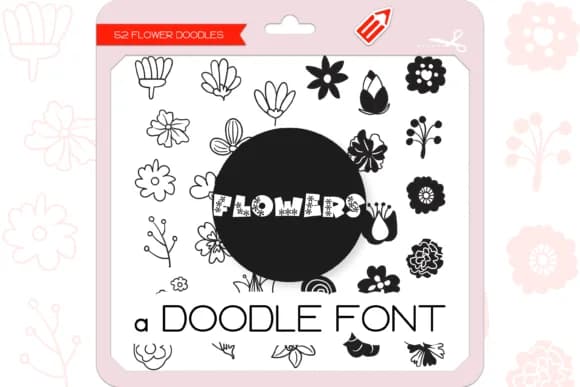
Flowers by WADLEN is a hand-drawn dingbat font that replaces each letter with a unique floral illustration. The collection includes 52 individual flower doodles, each with enough organic character that they genuinely feel like they came from a sketchbook rather than being generated. This distinction matters when you're trying to create work that reads as thoughtfully made instead of templated.
These doodles work beautifully as modular decorative elements. String them together for wedding invitation borders and save-the-date cards, layer them across scrapbook pages, or scatter them on gift tags and stickers where a hand-drawn quality brings real credibility to the overall impression. DIY craft labels, botanical journal covers, and floral-themed greeting card suites all gain visual impact from having this kind of character built in. Even simple floral dividers and frames feel intentional when composed from pieces that have personality rather than looking sterile or mass-produced.
The strength is in the variety: 52 different blooms mean you're not cycling through the same flower over and over. This gives you room to compose borders, corner elements, and accent clusters without the design feeling repetitive. If your work leans botanical, whimsical, or handcrafted in aesthetic, these doodles will do the heavy lifting for you. Get Flowers on Creative Fabrica and start working with these hand-drawn florals.
Style & Use Cases
- Overall Style
- Iconographic, Flower
- Use Case
- Icons, Accents
- Ideal For
- ornaments, bullets, and decorative flourishes
- Pairs With
- any text font
How to Install Flowers Font
Step-by-step instructions for every platform
- 1Download the Flowers font file (.ttf or .otf).
- 2Locate the downloaded file in your Downloads folder.
- 3Right-click the font file.
- 4Select "Install" to install for the current user, or "Install for all users" to make it available system-wide.
- 5Flowers is now available in Word, Photoshop, Illustrator, and all other apps.

Browse fonts by theme
Curated collections →Saw a font in a picture? Identify any font from an image with our free Font Finder.
More Dingbats Fonts
Browse all →







What pairs well with Flowers Font?
Flowers Font is a versatile dingbats font that works for both headings and body text. Pair it with a contrasting sans-serif or serif font to add visual interest and a clear distinction between titles and body copy.



Flowers Font
by WADLEN
Reviewed by the FontBoxDL team · Updated June 2026