
 1 / 8
1 / 8About Clouds Dingbats Font
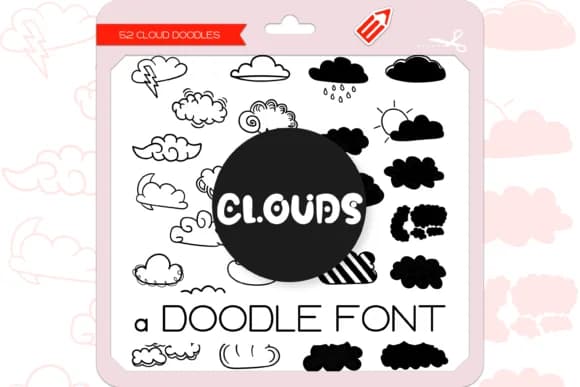
Clouds Dingbats, designed by WADLEN, features a collection of 52 hand-drawn cloud doodles with an organic, sketchy quality that feels personal rather than generic. The letterforms vary slightly in shape and weight, giving them a naturally imperfect charm that works beautifully across design projects. You get fluffy cumulus shapes, wispy horizontal layers, and stylized puffs that read as genuinely handmade, not algorithmically generated.
These doodles work wonderfully as borders and dividers, but they're far more versatile than that. Use them to frame content in scrapbooking layouts, add visual breaks to planner spreads and bullet journal pages, or punctuate nursery wall decal designs. They suit weather-themed greeting card suites, podcast episode artwork, and the header graphics on wellness and mindfulness blogs equally well. Educators and children's book illustrators find them useful as chapter dividers or page breaks that feel whimsical without veering into cutesy territory.
Designers working on projects that need warmth and genuine character will appreciate the sketchy hand-drawn aesthetic. DIY kids' room decor, self-published picture books, and lifestyle brand assets all benefit from having 52 different cloud variations available. Pick up Clouds Dingbats on Creative Fabrica and keep these organic shapes close at hand for your next project.
Style & Use Cases
- Overall Style
- Iconographic, Cloud
- Use Case
- Icons, Accents
- Ideal For
- ornaments, bullets, and decorative flourishes
- Pairs With
- any text font
How to Install Clouds Dingbats Font
Step-by-step instructions for every platform
- 1Download the Clouds Dingbats font file (.ttf or .otf).
- 2Locate the downloaded file in your Downloads folder.
- 3Right-click the font file.
- 4Select "Install" to install for the current user, or "Install for all users" to make it available system-wide.
- 5Clouds Dingbats is now available in Word, Photoshop, Illustrator, and all other apps.

Browse fonts by theme
Curated collections →Saw a font in a picture? Identify any font from an image with our free Font Finder.
More Dingbats Fonts
Browse all →







What pairs well with Clouds Dingbats Font?
Clouds Dingbats Font is a versatile dingbats font that works for both headings and body text. Pair it with a contrasting sans-serif or serif font to add visual interest and a clear distinction between titles and body copy.



Clouds Dingbats Font
by WADLEN
Reviewed by the FontBoxDL team · Updated June 2026