 Firefox
 1 / 5
1 / 5About Flowers Font
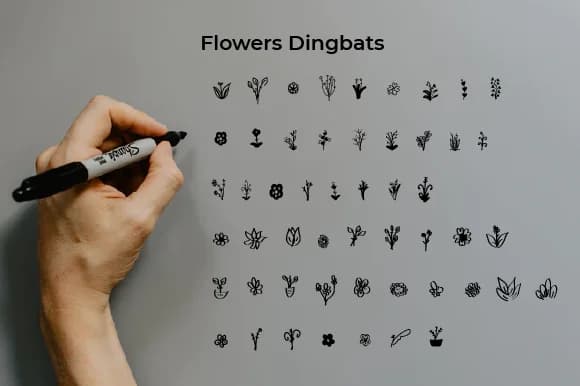
This font whispers elegance through delicate botanical shapes. Flowers, designed by Ciriative, is a dingbats collection that brings real ornamental depth to any project needing a softer, more decorative touch.
Dingbats are perfect for creating layered compositions, and these floral characters work wonderfully in wedding invitation suites where they frame text and add visual interest without overwhelming the overall design. They work equally well in botanical stationery designs, DIY craft signage, and hand-lettered greeting cards where individual characters transform into miniature decorative elements. Because they're vector-based characters rather than traditional typography, you can scale them freely without losing crispness, making them adaptable across any print format or size. Each character functions as a standalone ornament, but they also layer beautifully to create border patterns, corner flourishes, and custom arrangements. Scrapbooking projects, letterpress compositions, and illustration work all benefit from the way these shapes combine and layer to build visual depth.
For projects mixing decorative elements with readable text, pair Flowers with a clean, understated sans-serif for body copy. The contrast keeps layouts from feeling overly fussy while preserving the botanical charm. You'll find Flowers waiting on Creative Fabrica whenever you're ready to add it to your collection.
Style & Use Cases
- Overall Style
- Iconographic, Type
- Use Case
- Icons, Accents
- Ideal For
- ornaments, bullets, and decorative flourishes
- Pairs With
- any text font
How to Install Flowers Font
Step-by-step instructions for every platform
- 1Download the Flowers font file (.ttf or .otf).
- 2Locate the downloaded file in your Downloads folder.
- 3Right-click the font file.
- 4Select "Install" to install for the current user, or "Install for all users" to make it available system-wide.
- 5Flowers is now available in Word, Photoshop, Illustrator, and all other apps.
More by Ciriative
View all →

Browse fonts by theme
Curated collections →Saw a font in a picture? Identify any font from an image with our free Font Finder.
More Dingbats Fonts
Browse all →







What pairs well with Flowers Font?
Flowers Font is a versatile dingbats font that works for both headings and body text. Pair it with a contrasting sans-serif or serif font to add visual interest and a clear distinction between titles and body copy.



Flowers Font
by Ciriative
Reviewed by the FontBoxDL team · Updated July 2026