 Firefox
 1 / 5
1 / 5About Flower Icons Font
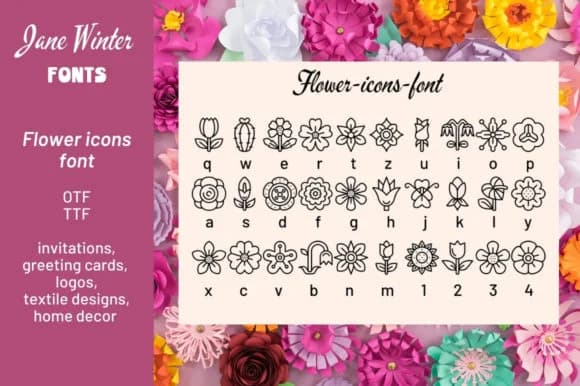
Flower Icons by Stella Sky is a dingbat collection of 30 flower illustrations that bring botanical charm to digital and print projects. Rather than a traditional typeface with letters, this is a symbol font where each keystroke produces a different blossom, from delicate petals to full blooms, giving designers a ready-made palette of nature-inspired graphics to work with.
The real value here is speed and consistency across your designs. When you're working on Easter greeting cards, floral gift labels, or spring stationery suites, having 30 coordinated flower marks means you can layer, arrange, and colorize them to build cohesive visuals without hunting through icon libraries or redrawing the same blooms repeatedly. DIY scrapbooking layouts benefit especially, since the icons scale cleanly and work equally well on a small gift tag or at poster size.
Decorative dingbat fonts like this one also shine for hand-lettered signage, botanical packaging, or craft print-and-cut projects where you want to add floral accents without relying on external imagery. Since all 30 flowers live in one compact font file, your designs stay lightweight and portable across different software. Grab Flower Icons on Creative Fabrica and start building botanical-themed work that feels intentional and cohesive.
Style & Use Cases
- Overall Style
- Iconographic, Flower Icons
- Use Case
- Icons, Accents
- Ideal For
- ornaments, bullets, and decorative flourishes
- Pairs With
- any text font
How to Install Flower Icons Font
Step-by-step instructions for every platform
- 1Download the Flower Icons font file (.ttf or .otf).
- 2Locate the downloaded file in your Downloads folder.
- 3Right-click the font file.
- 4Select "Install" to install for the current user, or "Install for all users" to make it available system-wide.
- 5Flower Icons is now available in Word, Photoshop, Illustrator, and all other apps.
Browse fonts by theme
Curated collections →Saw a font in a picture? Identify any font from an image with our free Font Finder.
More Dingbats Fonts
Browse all →







What pairs well with Flower Icons Font?
Flower Icons Font is a versatile dingbats font that works for both headings and body text. Pair it with a contrasting sans-serif or serif font to add visual interest and a clear distinction between titles and body copy.



Flower Icons Font
by Stella Sky
Reviewed by the FontBoxDL team · Updated July 2026