 Firefox
 1 / 8
1 / 8About Flower Frames Font
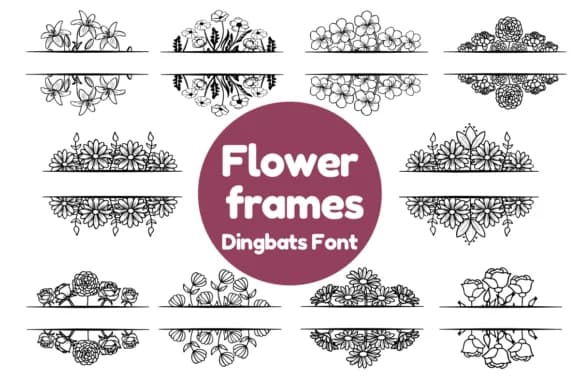
There's something warm and tactile about florals that frame your designs. Flower Frames, designed by Nun Sukhwan, is a dingbat collection where every frame springs from hand-drawn blossoms instead of geometric shapes. The result feels like a pressed-flower archive captured as a typeface. Each ornament is richly detailed, built entirely from connected petals and leaves that curve and overlap with a natural randomness.
Valentine's invitation suites, boutique candle labels, vintage-style scrapbooking spreads, and DIY craft sticker sheets all benefit from the playful botanical aesthetic. You'll find these frames work beautifully framing handwritten text on greeting cards, building ornamental borders around watercolor paintings, or layered into collages on kraft paper. The monochrome structure offers real flexibility in execution: print them single-color, wash over them with watercolor, or adapt them for digital designs where botanical detail becomes the strongest visual element.
Pair Flower Frames with a straightforward sans-serif for any body text or captions. Something clean and unfussy lets the ornamental details shine rather than competing for attention. Find Flower Frames on Creative Fabrica, ready to add that handcrafted warmth to your next project.
Style & Use Cases
- Overall Style
- Iconographic, Dingbats Font
- Use Case
- Icons, Accents
- Ideal For
- ornaments, bullets, and decorative flourishes
- Pairs With
- any text font
How to Install Flower Frames Font
Step-by-step instructions for every platform
- 1Download the Flower Frames font file (.ttf or .otf).
- 2Locate the downloaded file in your Downloads folder.
- 3Right-click the font file.
- 4Select "Install" to install for the current user, or "Install for all users" to make it available system-wide.
- 5Flower Frames is now available in Word, Photoshop, Illustrator, and all other apps.
More by Nun Sukhwan
View all →



Browse fonts by theme
Curated collections →Saw a font in a picture? Identify any font from an image with our free Font Finder.
More Dingbats Fonts
Browse all →







What pairs well with Flower Frames Font?
Flower Frames Font is a versatile dingbats font that works for both headings and body text. Pair it with a contrasting sans-serif or serif font to add visual interest and a clear distinction between titles and body copy.



Flower Frames Font
by Nun Sukhwan
Reviewed by the FontBoxDL team · Updated July 2026