 Firefox
 1 / 7
1 / 7About Flower Doodles Font
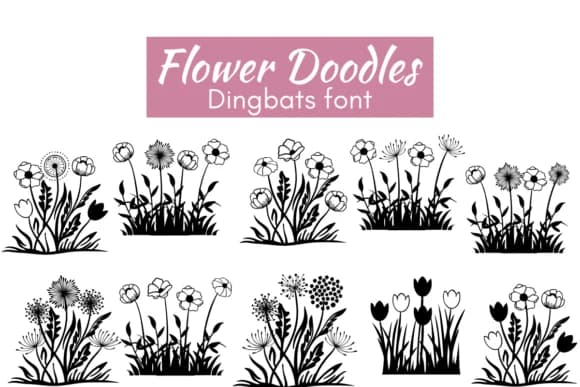
Flower Doodles, designed by Nun Sukhwan, is a dingbat font built entirely from hand-drawn floral motifs and botanical sketches. Each keystroke delivers a different bloom, leaf cluster, or garden element, letting you compose floral patterns naturally rather than hunting through scattered libraries or stitching together multiple fonts. The illustrations carry a vintage-inspired, slightly whimsical quality that feels both nostalgic and genuinely playful.
This font is built for sticker sheet creators, scrapbooking enthusiasts, and anyone assembling printable gift tags or holiday party stationery. Teachers rely on it to build bulletin board borders that actually catch kids' eyes. Crafters designing Valentine cardstock suites or DIY wedding guest favor labels find genuine value here. The drawings share a cohesive hand that generic clip art libraries can't match. You can layer and combine characters to construct floral borders, textured backgrounds, or accent vignettes without reaching for a second design tool.
The font shines brightest in paper-based projects and low-poly graphic work, but translates surprisingly well to digital stickers, small-format print, and email graphics too. Designers working on seasonal campaigns or craft-focused brands will find strong value in the breadth of forms available. Get Flower Doodles on Creative Fabrica to access the full botanical vocabulary.
Style & Use Cases
- Overall Style
- Iconographic, Dingbats Font
- Use Case
- Icons, Accents
- Ideal For
- ornaments, bullets, and decorative flourishes
- Pairs With
- any text font
How to Install Flower Doodles Font
Step-by-step instructions for every platform
- 1Download the Flower Doodles font file (.ttf or .otf).
- 2Locate the downloaded file in your Downloads folder.
- 3Right-click the font file.
- 4Select "Install" to install for the current user, or "Install for all users" to make it available system-wide.
- 5Flower Doodles is now available in Word, Photoshop, Illustrator, and all other apps.
More by Nun Sukhwan
View all →



Browse fonts by theme
Curated collections →Saw a font in a picture? Identify any font from an image with our free Font Finder.
More Dingbats Fonts
Browse all →







What pairs well with Flower Doodles Font?
Flower Doodles Font is a versatile dingbats font that works for both headings and body text. Pair it with a contrasting sans-serif or serif font to add visual interest and a clear distinction between titles and body copy.



Flower Doodles Font
by Nun Sukhwan
Reviewed by the FontBoxDL team · Updated July 2026