
 1 / 8
1 / 8About Flower Font
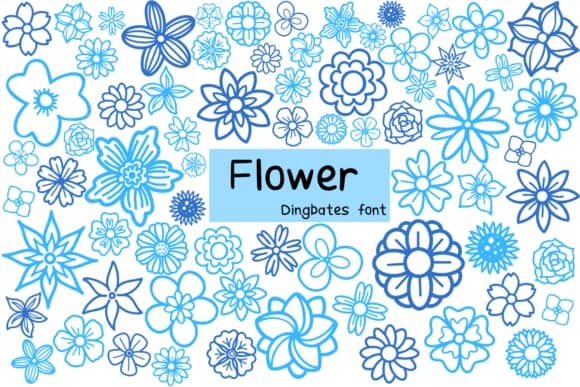
There's something instantly soothing about hand-sketched florals scattered across a design. Flower, designed by Chonada, is a dingbats font that translates botanical line work into individual glyphs, each one a delicate sketch of petals, leaves, and stems. Rather than chasing photorealistic detail, it captures that organic, slightly loose quality of quick pen drawings. This approach makes it feel genuinely handmade rather than mechanically precise.
What makes this font so versatile is how it works across different creative contexts. Wedding invitation suites benefit from the gentle, romantic vibe it brings to envelope liners and card inserts. Nature journal spreads come alive with these botanical marks breaking up the page, creating visual breathing room. Custom stickers and craft labels gain real character when built around these hand-drawn florals. DIY greeting cards and thank-you notes feel personal in a way digital fonts rarely achieve on their own. The sketch-style approach means the florals work equally well as standalone decorative elements or as fills layered behind text.
Pair Flower with a clean, modern sans-serif when you need body text to sit comfortably alongside these decorative forms. The contrast keeps designs readable while maintaining that handmade aesthetic you're after. You can grab it on Creative Fabrica and start incorporating these botanical marks into whatever you're building next.
Style & Use Cases
- Overall Style
- Iconographic, Flower
- Use Case
- Icons, Accents
- Ideal For
- ornaments, bullets, and decorative flourishes
- Pairs With
- any text font
How to Install Flower Font
Step-by-step instructions for every platform
- 1Download the Flower font file (.ttf or .otf).
- 2Locate the downloaded file in your Downloads folder.
- 3Right-click the font file.
- 4Select "Install" to install for the current user, or "Install for all users" to make it available system-wide.
- 5Flower is now available in Word, Photoshop, Illustrator, and all other apps.




Browse fonts by theme
Curated collections →Saw a font in a picture? Identify any font from an image with our free Font Finder.
More Dingbats Fonts
Browse all →







What pairs well with Flower Font?
Flower Font is a versatile dingbats font that works for both headings and body text. Pair it with a contrasting sans-serif or serif font to add visual interest and a clear distinction between titles and body copy.



Flower Font
by Chonada
Reviewed by the FontBoxDL team · Updated July 2026