
 1 / 2
1 / 2About Flipflop Font
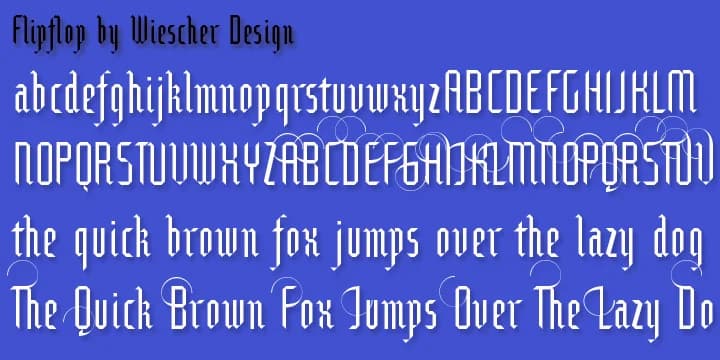
Flipflop is a blackletter typeface by Gert Wiescher that breaks the traditional rules of letterform construction. Rather than drawing classic Gothic characters the conventional way, Wiescher built each glyph from small geometric shapes: squares and triangles arranged in a deliberate "flip or flop" pattern that gives the font its name. The system creates a visual illusion at first glance, reading unmistakably as blackletter (Fraktur style), while revealing modular geometry under closer inspection. A few glyphs like the degree symbol and brève required stepping outside this constraint, but the geometric concept holds throughout the rest of the character set.
Flipflop works best wherever you want historical flavor combined with a distinctly modern twist. The decorative capital letters feature ornamental swings and flourishes that add visual personality to headlines and titles. It's particularly strong for custom monogram designs, vintage-inspired whiskey labels, letterpress portfolio pieces, and small-batch pottery packaging, where the unusual construction becomes an asset rather than a liability. The geometric structure maintains surprising legibility despite its abstract approach, bridging the gap between display typography and functional design. This is the typeface for designers who appreciate the unconventional side of blackletter without apology. Grab it from Creative Fabrica and explore a typeface that respects tradition while completely reimagining how letterforms can be assembled.
Style & Use Cases
- Overall Style
- Ornate, Gothic
- Use Case
- Logos, Certificates
- Ideal For
- medieval themes, band merch, and tattoo lettering
- Pairs With
- a clean sans-serif for body text
How to Install Flipflop Font
Step-by-step instructions for every platform
- 1Download the Flipflop font file (.ttf or .otf).
- 2Locate the downloaded file in your Downloads folder.
- 3Right-click the font file.
- 4Select "Install" to install for the current user, or "Install for all users" to make it available system-wide.
- 5Flipflop is now available in Word, Photoshop, Illustrator, and all other apps.
More by Wiescher-Design
View all →
Browse fonts by theme
Curated collections →Saw a font in a picture? Identify any font from an image with our free Font Finder.
More Blackletter Fonts
Browse all →







What pairs well with Flipflop Font?
Flipflop Font is a blackletter font that shines as a display or heading face. Pair it with a clean serif or sans-serif font for body text — the contrast creates a clear hierarchy while the two styles stay balanced and easy to read.



Flipflop Font
Reviewed by the FontBoxDL team · Updated June 2026