 Firefox
 1 / 4
1 / 4About Fleurious Font
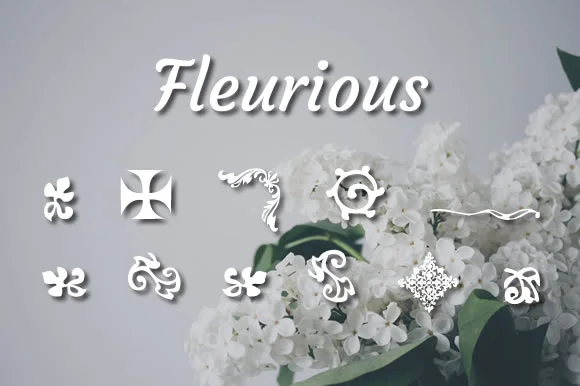
You're designing a wedding invitation suite and need those perfect flourishes to tie it all together. Fleurious, designed by Proportional Lime, is a dingbats collection built on centuries of printing history. The font draws inspiration from how decorative practices shifted significantly from era to era, capturing the ornamental language of different periods all in one package. Each historical moment brought its own visual preferences, and this font honors that depth.
Use Fleurious for ornamental borders on letterpress-style invitations, decorative elements in scrapbooking layouts, embellishments on vintage-inspired packaging labels, or accents in hand-lettered signage. With over 200 glyphs at your disposal, you've got enough ornamentation to create genuine variety across your projects. Dingbats fonts live or die by their breadth, and this collection truly delivers what you need. Add flourishes to reproduction ephemera, design period-correct details on book covers or stationery, or simply find quirky accents that feel intentional rather than afterthoughts.
The range of glyphs truly means you can layer and combine elements without exhausting your options or resorting to obvious repetition. Pick it up on Creative Fabrica today and start building ornate, distinctive designs with confidence. This is exactly the kind of font that justifies itself through genuine use.
Style & Use Cases
- Overall Style
- Iconographic
- Use Case
- Icons, Accents
- Ideal For
- ornaments, bullets, and decorative flourishes
- Pairs With
- any text font
How to Install Fleurious Font
Step-by-step instructions for every platform
- 1Download the Fleurious font file (.ttf or .otf).
- 2Locate the downloaded file in your Downloads folder.
- 3Right-click the font file.
- 4Select "Install" to install for the current user, or "Install for all users" to make it available system-wide.
- 5Fleurious is now available in Word, Photoshop, Illustrator, and all other apps.
More by Proportional Lime
View all →

Browse fonts by theme
Curated collections →Saw a font in a picture? Identify any font from an image with our free Font Finder.
More Dingbats Fonts
Browse all →







What pairs well with Fleurious Font?
Fleurious Font is a versatile dingbats font that works for both headings and body text. Pair it with a contrasting sans-serif or serif font to add visual interest and a clear distinction between titles and body copy.




Fleurious Font
Reviewed by the FontBoxDL team · Updated August 2026