 Firefox
 1 / 9
1 / 9About Fletcher Typewriter Font & Extras Font
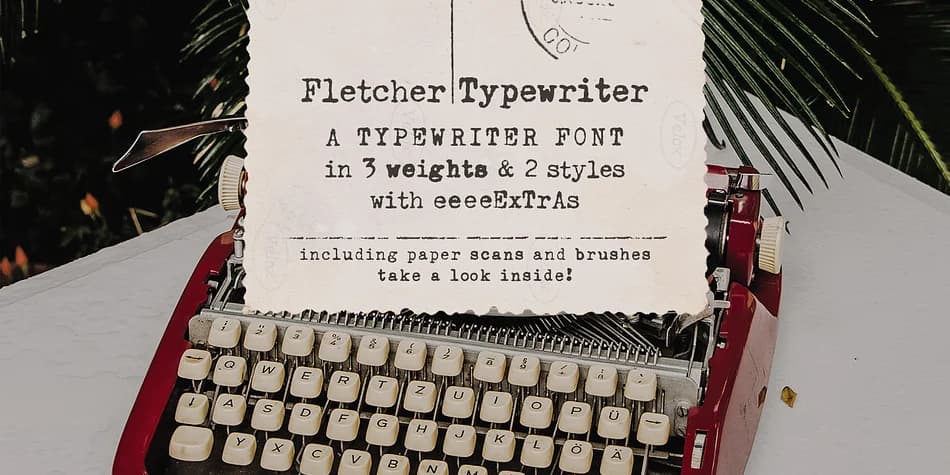
Imagine designing a vintage postcard or antique-inspired branding suite without hunting through stock photo sites. Fletcher Typewriter Font & Extras, created by Ana's Fonts, is a complete kit that brings that typewriter-era aesthetic straight into your projects. The collection pairs a faithful typewriter typeface with genuine texture elements drawn from old correspondence.
The font family comes in three individual weights (regular, bold, and black) plus two distinct styles (regular and jumpy), letting you set anything from a small caption to a bold headline with authentic character. The kit includes ten aged paper scans with transparent backgrounds, fifteen vintage stamps, and six stain and splatter elements available as brushes, PNGs, or additional glyphs. This combination works well for retro product packaging labels, DIY wedding invitation suites, craft business branding, and ephemera or mixed-media art projects where hand-finished texture matters.
The jumpy style is particularly useful for adding visual rhythm to social media graphics, while the paper scans and stamps integrate into branding mockups and stationery designs. A starter template helps you see how the pieces work together before diving in. You can find Fletcher Typewriter Font & Extras on Creative Fabrica.
Style & Use Cases
- Overall Style
- Iconographic
- Use Case
- Icons, Accents
- Ideal For
- ornaments, bullets, and decorative flourishes
- Pairs With
- any text font
How to Install Fletcher Typewriter Font & Extras Font
Step-by-step instructions for every platform
- 1Download the Fletcher Typewriter Font & Extras font file (.ttf or .otf).
- 2Locate the downloaded file in your Downloads folder.
- 3Right-click the font file.
- 4Select "Install" to install for the current user, or "Install for all users" to make it available system-wide.
- 5Fletcher Typewriter Font & Extras is now available in Word, Photoshop, Illustrator, and all other apps.
More by Ana's Fonts
View all →
Browse fonts by theme
Curated collections →Saw a font in a picture? Identify any font from an image with our free Font Finder.
More Dingbats Fonts
Browse all →







What pairs well with Fletcher Typewriter Font & Extras Font?
Fletcher Typewriter Font & Extras Font is a versatile dingbats font that works for both headings and body text. Pair it with a contrasting sans-serif or serif font to add visual interest and a clear distinction between titles and body copy.



Fletcher Typewriter Font & Extras Font
by Ana's Fonts
Reviewed by the FontBoxDL team · Updated August 2026