 Firefox
 1 / 8
1 / 8About Fireworks Doodle Font
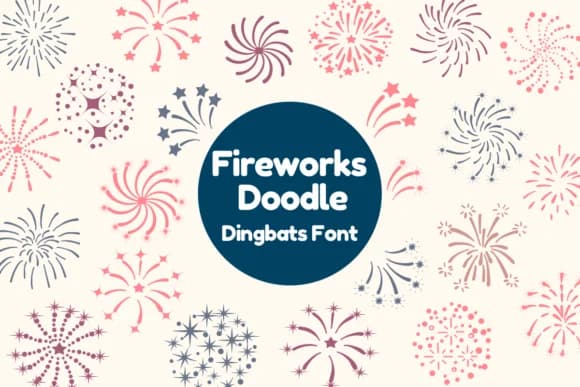
You're laying out a Fourth of July party invitation, and instead of hunting for fireworks clip art, Fireworks Doodle by Nun Sukhwan just handles it for you. This dingbat font replaces standard letters with playful bursts and sparkles, letting you build festive compositions instantly. The illustrations feel hand-drawn and energetic without being overly detailed, which means they work just as well at small sizes in sticker sheets as they do large on a poster background.
Party flyer headers, greeting card accents, and custom Etsy shop graphics all benefit from this kind of purpose-built character set. Teachers might use it for classroom award certificates or bulletin board decorations, while event designers can layer it with type to create multi-layered festive prints. Social media graphics for event promotion, DIY craft packaging, and custom sticker sheets all come together faster when the dingbats do the heavy lifting. Monochrome styling keeps things versatile across different print and digital contexts, so the doodles read clearly whether printed on white stock or reversed onto colored backgrounds.
Each character holds up well across different scales and applications. Grab it from Creative Fabrica and you'll have everything you need for celebrations that call for a little visual spark.
Style & Use Cases
- Overall Style
- Iconographic, Dingbats Font
- Use Case
- Icons, Accents
- Ideal For
- ornaments, bullets, and decorative flourishes
- Pairs With
- any text font
How to Install Fireworks Doodle Font
Step-by-step instructions for every platform
- 1Download the Fireworks Doodle font file (.ttf or .otf).
- 2Locate the downloaded file in your Downloads folder.
- 3Right-click the font file.
- 4Select "Install" to install for the current user, or "Install for all users" to make it available system-wide.
- 5Fireworks Doodle is now available in Word, Photoshop, Illustrator, and all other apps.
More by Nun Sukhwan
View all →



Browse fonts by theme
Curated collections →Saw a font in a picture? Identify any font from an image with our free Font Finder.
More Dingbats Fonts
Browse all →







What pairs well with Fireworks Doodle Font?
Fireworks Doodle Font is a versatile dingbats font that works for both headings and body text. Pair it with a contrasting sans-serif or serif font to add visual interest and a clear distinction between titles and body copy.



Fireworks Doodle Font
by Nun Sukhwan
Reviewed by the FontBoxDL team · Updated August 2026