 Firefox
 1 / 6
1 / 6About Fire Flames Font
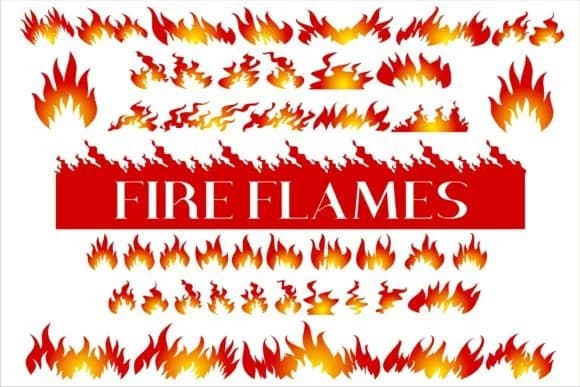
This font hits with pure visual intensity. Fire Flames, designed by edywiyonopp, is a dingbat collection packed with dozens of flame illustrations rendered in different shapes, angles, and heat levels. Some glyphs show bold tongues of fire, others capture delicate wisps of smoke and embers, giving you real variety so you're not forced to recycle a single shape across every project.
The collection works beautifully for indie game cover art, where a few well-placed flames set an immediate tone of urgency or danger. Zine headers and punk-style graphics pull raw energy from these shapes too. Spicy food brand labels (hot sauce packaging, sriracha bottles, jalapeño product design) need visual heat without words, and these flames land that punch every time. Thriller book jackets, indie comic book panels, and DIY music poster art all gain instant attitude when layered with bold type and strategic color placement. The versatility means you can mix and match glyphs to build custom compositions rather than settling for predictable repeats.
Pair this with a geometric or industrial sans-serif for headlines to anchor your hierarchy and keep body text readable without visual competition. The contrast between ornamental flames and clean letterforms creates genuine visual separation and balance. Grab it from Creative Fabrica and let this heat strengthen your design arsenal.
Style & Use Cases
- Overall Style
- Iconographic, Fonts
- Use Case
- Icons, Accents
- Ideal For
- ornaments, bullets, and decorative flourishes
- Pairs With
- any text font
How to Install Fire Flames Font
Step-by-step instructions for every platform
- 1Download the Fire Flames font file (.ttf or .otf).
- 2Locate the downloaded file in your Downloads folder.
- 3Right-click the font file.
- 4Select "Install" to install for the current user, or "Install for all users" to make it available system-wide.
- 5Fire Flames is now available in Word, Photoshop, Illustrator, and all other apps.
More by edywiyonopp
View all →

Browse fonts by theme
Curated collections →Saw a font in a picture? Identify any font from an image with our free Font Finder.
More Dingbats Fonts
Browse all →







What pairs well with Fire Flames Font?
Fire Flames Font is a versatile dingbats font that works for both headings and body text. Pair it with a contrasting sans-serif or serif font to add visual interest and a clear distinction between titles and body copy.



Fire Flames Font
by edywiyonopp
Reviewed by the FontBoxDL team · Updated August 2026