 Firefox
 1 / 4
1 / 4About Finger Prints Glyph Font
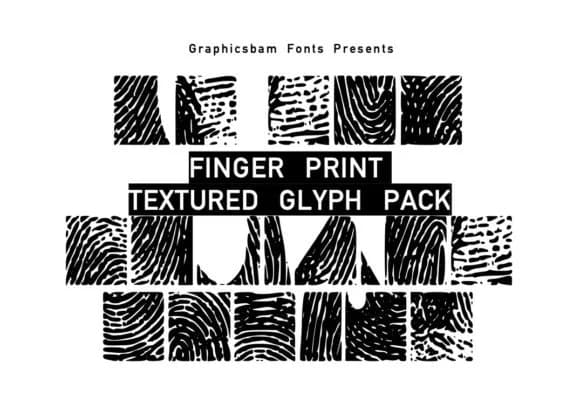
Finger Prints Glyph Font by GraphicsBam Fonts is a dingbat collection built entirely from organic fingerprint and palm impression textures. The set solves a common design problem: adding natural, human-made texture without redrawing the same shapes constantly. Each glyph carries that worn, lived-in quality that feels authentic rather than manufactured. There's real character baked in, the kind that reads as intentional but not over-polished or too slick.
The pack works particularly well for organic cosmetics branding, eco-friendly product packaging, and nature-focused print-on-demand projects where you need visual texture and credibility. School activity sheets, environmental education posters, and craft-focused packaging all benefit from its grounded, tactile language. You'll also find it useful for DIY signage projects and handmade-focused shop graphics where that fingerprint element reinforces the handmade story. Extensive variation across the collection means you won't end up recycling the same mark within a layout or project.
This matters for designers working in spaces where natural and organic imagery carries real meaning. For designers building brand identity around authenticity, or anyone seeking genuine-feeling texture in their work, the collection fills a specific gap. Generic texture libraries rarely capture this particular character. Head over to Creative Fabrica to add it to your toolkit.
Style & Use Cases
- Overall Style
- Iconographic, Design
- Use Case
- Icons, Accents
- Ideal For
- ornaments, bullets, and decorative flourishes
- Pairs With
- any text font
How to Install Finger Prints Glyph Font Font
Step-by-step instructions for every platform
- 1Download the Finger Prints Glyph Font font file (.ttf or .otf).
- 2Locate the downloaded file in your Downloads folder.
- 3Right-click the font file.
- 4Select "Install" to install for the current user, or "Install for all users" to make it available system-wide.
- 5Finger Prints Glyph Font is now available in Word, Photoshop, Illustrator, and all other apps.
More by GraphicsBam Fonts
View all →
Browse fonts by theme
Curated collections →Saw a font in a picture? Identify any font from an image with our free Font Finder.
More Dingbats Fonts
Browse all →







What pairs well with Finger Prints Glyph Font?
Finger Prints Glyph Font is a versatile dingbats font that works for both headings and body text. Pair it with a contrasting sans-serif or serif font to add visual interest and a clear distinction between titles and body copy.



Finger Prints Glyph Font
Reviewed by the FontBoxDL team · Updated July 2026