 Firefox
 1 / 8
1 / 8About Feline Lucky Font
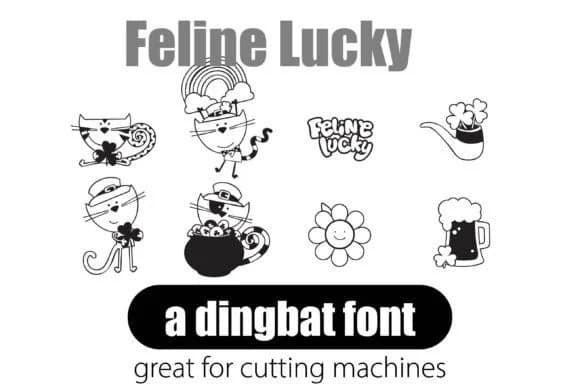
Feline Lucky by Illustration Ink is a retro dingbat font featuring 26 groovy cat illustrations from sixties design. The appeal is straightforward: type a letter and get a ready-made design element, no graphics software required. These playful cats and matching florals work beautifully in wedding invitation suites, Etsy product labels, boutique skincare packaging, and hand-lettered DIY craft signs. The style stays distinctly retro without tipping into kitsch.
Being vector-based means the icons scale flawlessly at any size, from delicate product stickers to oversized signage. You avoid the friction of hunting the right resolution, managing multiple file versions, or dealing with quality loss from compression. Drop everything into Adobe, Canva, or Microsoft Office and control the entire composition from one place. Recolor to match your palette, adjust sizing, position elements, apply effects. All standard typography controls work here. The consistent line weight and visual language throughout the set means your finished designs feel cohesive and intentional rather than assembled from mismatched pieces.
Need to stretch beyond the 26 base characters? Try layering, rotating, and tinting the glyphs to expand possibilities. Get Feline Lucky on Creative Fabrica and bring sixties feline energy to your next project.
Style & Use Cases
- Overall Style
- Iconographic, Dingbat
- Use Case
- Icons, Accents
- Ideal For
- ornaments, bullets, and decorative flourishes
- Pairs With
- any text font
How to Install Feline Lucky Font
Step-by-step instructions for every platform
- 1Download the Feline Lucky font file (.ttf or .otf).
- 2Locate the downloaded file in your Downloads folder.
- 3Right-click the font file.
- 4Select "Install" to install for the current user, or "Install for all users" to make it available system-wide.
- 5Feline Lucky is now available in Word, Photoshop, Illustrator, and all other apps.
More by Illustration Ink
View all →



Browse fonts by theme
Curated collections →Saw a font in a picture? Identify any font from an image with our free Font Finder.
More Dingbats Fonts
Browse all →







What pairs well with Feline Lucky Font?
Feline Lucky Font is a versatile dingbats font that works for both headings and body text. Pair it with a contrasting sans-serif or serif font to add visual interest and a clear distinction between titles and body copy.



Feline Lucky Font
Reviewed by the FontBoxDL team · Updated June 2026