 Firefox
 1 / 8
1 / 8About Family Story Font
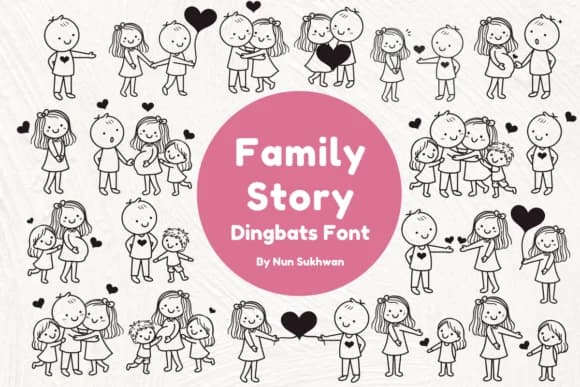
Family Story by Nun Sukhwan is a dingbats collection of hand-drawn figures and symbols designed for telling visual stories without traditional letters. Rather than a conventional typeface, it's a visual vocabulary of stick-figure families, new parents, children, and intimate moments rendered in a loose, doodle-like style. This aesthetic combines personality with polish, making the whole collection feel both personal and genuinely intentional.
The real power here is in specificity. You get the exact icons you need for custom family trees, scrapbooking layouts, baby announcement cards, pregnancy journal pages, and genealogy projects. Each symbol is drawn with enough charm to stand alone, yet clean enough to work alongside handwritten scripts or minimal sans-serifs without feeling cluttered. Pair the characters with simple typography and you've got something that looks intentional and warm, not like a clip-art grab bag.
This is where the font shines for anyone documenting milestones or creating memory projects. From genealogy illustrations to custom scrapbook pages and personalized gift stationery, Family Story gives you a complete visual language built just for these moments. The hand-drawn characters convey genuine emotion without requiring you to commission custom artwork. Get the font on Creative Fabrica and start building visual stories that feel genuinely yours.
Style & Use Cases
- Overall Style
- Iconographic, Family
- Use Case
- Icons, Accents
- Ideal For
- ornaments, bullets, and decorative flourishes
- Pairs With
- any text font
How to Install Family Story Font
Step-by-step instructions for every platform
- 1Download the Family Story font file (.ttf or .otf).
- 2Locate the downloaded file in your Downloads folder.
- 3Right-click the font file.
- 4Select "Install" to install for the current user, or "Install for all users" to make it available system-wide.
- 5Family Story is now available in Word, Photoshop, Illustrator, and all other apps.
More by Nun Sukhwan
View all →



Browse fonts by theme
Curated collections →Saw a font in a picture? Identify any font from an image with our free Font Finder.
More Dingbats Fonts
Browse all →







What pairs well with Family Story Font?
Family Story Font is a versatile dingbats font that works for both headings and body text. Pair it with a contrasting sans-serif or serif font to add visual interest and a clear distinction between titles and body copy.



Family Story Font
by Nun Sukhwan
Reviewed by the FontBoxDL team · Updated June 2026