 Firefox
 1 / 8
1 / 8About Fall Doodle Font
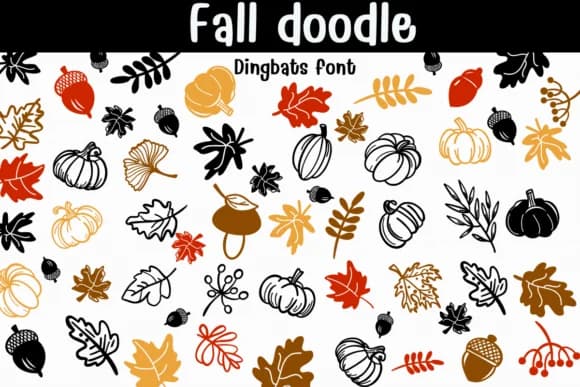
Fall Doodle by Sontaya is a hand-drawn dingbats collection that captures autumn's warmth in quick, typeable form. Each glyph is a crisp vector with rounded terminals and gentle, organic asymmetry, scaling beautifully from tiny planner stickers all the way to large-scale seasonal posters. The palette covers the full spread of fall imagery: oak and maple leaves, ginkgos, acorns, pumpkins, botanical sprigs, and berry clusters, each rendered in both outline and solid versions. This built-in contrast gives you instant light-and-dark interplay, making duotone combinations effortless.
What sets it apart is the keyboard mapping across the alphabet. Just type to assemble borders, repeating patterns, and decorative badges without toggling between design tools. The organic asymmetry and gentle bounce keep compositions feeling handmade rather than generic clip art. It's purpose-built for autumn greeting cards, fall-themed product packaging, scrapbooking pages, and Etsy shop branding where warmth and character matter. You can recolor the glyphs to match your brand palette, convert outlines to strokes for decal production, or layer filled and outline versions for genuine depth and dimension. Pair it with a chunky sans or cozy script and you'll achieve cohesive, inviting seasonal work. Get Fall Doodle from Creative Fabrica and start bringing autumn character to your work.
Style & Use Cases
- Overall Style
- Iconographic, Diy
- Use Case
- Icons, Accents
- Ideal For
- ornaments, bullets, and decorative flourishes
- Pairs With
- any text font
How to Install Fall Doodle Font
Step-by-step instructions for every platform
- 1Download the Fall Doodle font file (.ttf or .otf).
- 2Locate the downloaded file in your Downloads folder.
- 3Right-click the font file.
- 4Select "Install" to install for the current user, or "Install for all users" to make it available system-wide.
- 5Fall Doodle is now available in Word, Photoshop, Illustrator, and all other apps.
Browse fonts by theme
Curated collections →Saw a font in a picture? Identify any font from an image with our free Font Finder.
More Dingbats Fonts
Browse all →







What pairs well with Fall Doodle Font?
Fall Doodle Font is a versatile dingbats font that works for both headings and body text. Pair it with a contrasting sans-serif or serif font to add visual interest and a clear distinction between titles and body copy.



Fall Doodle Font
by Sontaya
Reviewed by the FontBoxDL team · Updated July 2026