 Firefox
 1 / 7
1 / 7About Fake Skull Font
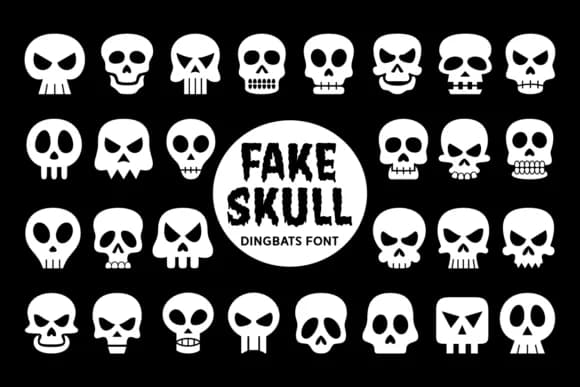
Fake Skull by Situjuh is a dingbats font built entirely from skull characters, where each letter and number becomes its own distinct skull design. Rather than working as a traditional typeface, it functions as an instant icon library: type any character and you get a different skull variation. The range spans from cute, cartoon-style skulls to menacing versions and geometric abstractions, which means you have visual flexibility without ever leaving the font.
This approach pays off most when you need multiple skull graphics without the sourcing overhead. Halloween event posters benefit immediately from having a dozen ready-made skull options, while apparel designers can dress t-shirts, hoodies, and totebags with characters that feel hand-drawn and intentional. Tattoo shop branding, band merchandise packaging, and goth label design all become faster to execute because you're not hunting for individual illustrations. The same efficiency applies to sticker sets and print-on-demand product labels where impact matters.
The real draw here is having visual range on tap. Designers working in alternative culture spaces, those building edgy brand aesthetics, or anyone creating Halloween-heavy collections will find the diversity genuinely useful without the friction of asset sourcing. Grab Fake Skull on Creative Fabrica to access the full character set.
Style & Use Cases
- Overall Style
- Iconographic, Fake Skull Font
- Use Case
- Icons, Accents
- Ideal For
- ornaments, bullets, and decorative flourishes
- Pairs With
- any text font
How to Install Fake Skull Font
Step-by-step instructions for every platform
- 1Download the Fake Skull font file (.ttf or .otf).
- 2Locate the downloaded file in your Downloads folder.
- 3Right-click the font file.
- 4Select "Install" to install for the current user, or "Install for all users" to make it available system-wide.
- 5Fake Skull is now available in Word, Photoshop, Illustrator, and all other apps.

Browse fonts by theme
Curated collections →Saw a font in a picture? Identify any font from an image with our free Font Finder.
More Dingbats Fonts
Browse all →







What pairs well with Fake Skull Font?
Fake Skull Font is a versatile dingbats font that works for both headings and body text. Pair it with a contrasting sans-serif or serif font to add visual interest and a clear distinction between titles and body copy.



Fake Skull Font
by Situjuh
Reviewed by the FontBoxDL team · Updated June 2026